How to Set Up Taxes for Your Wix Store
Getting taxes right in your Wix store is not optional — it's a legal requirement for any serious business. In this guide, you'll learn how to access the Wix tax settings, choose between automatic and manual tax calculations, and decide whether to include tax in your product prices or add it at checkout. Try Wix for free via this link to follow along.
1. Access the Tax Settings in Your Wix Store
From your Wix dashboard, navigate to your store settings and look for the Taxes section. You'll find it alongside other settings like shipping and delivery fees.
Once you're inside the tax settings, you'll see two main approaches: automatic tax calculation via a third-party service, or manual tax rates that you configure yourself.
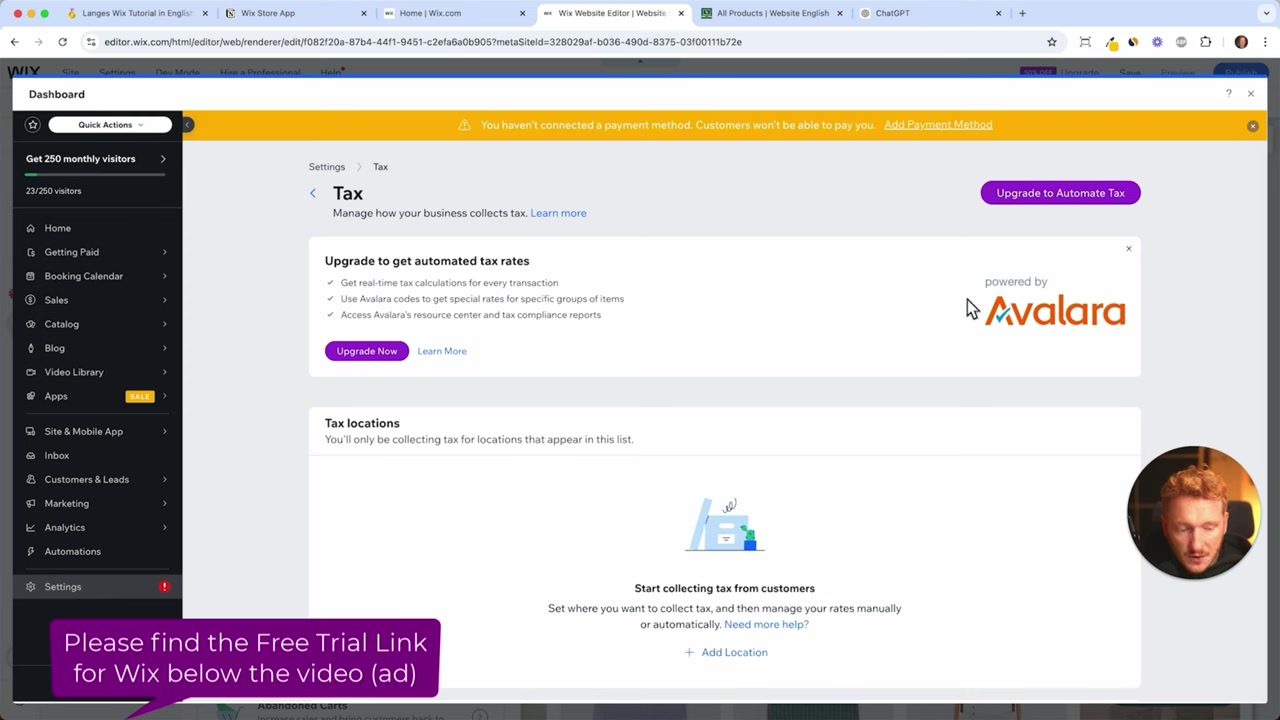
2. Use Avalara for Automatic Tax Calculations
Wix integrates with Avalara, a worldwide tax calculation service that automatically applies the correct tax rates for different countries and US states.
This is especially useful if you sell internationally or across multiple US states — because tax rules vary enormously. For example, Germany charges 19% VAT on most products, while the US has a different sales tax rate for every single state.
If you're selling in multiple regions, Avalara saves you a huge amount of time and keeps you compliant automatically.
3. Set Up Manual Tax Rates for a Single Location
If you only sell in one country or region, you can skip Avalara and configure tax rates manually.
Click Add Location, select your country, and then choose the relevant state or region. From there, you can set separate tax rates for:
- Products
- Services
- Cancellation fees
- Shipping and delivery
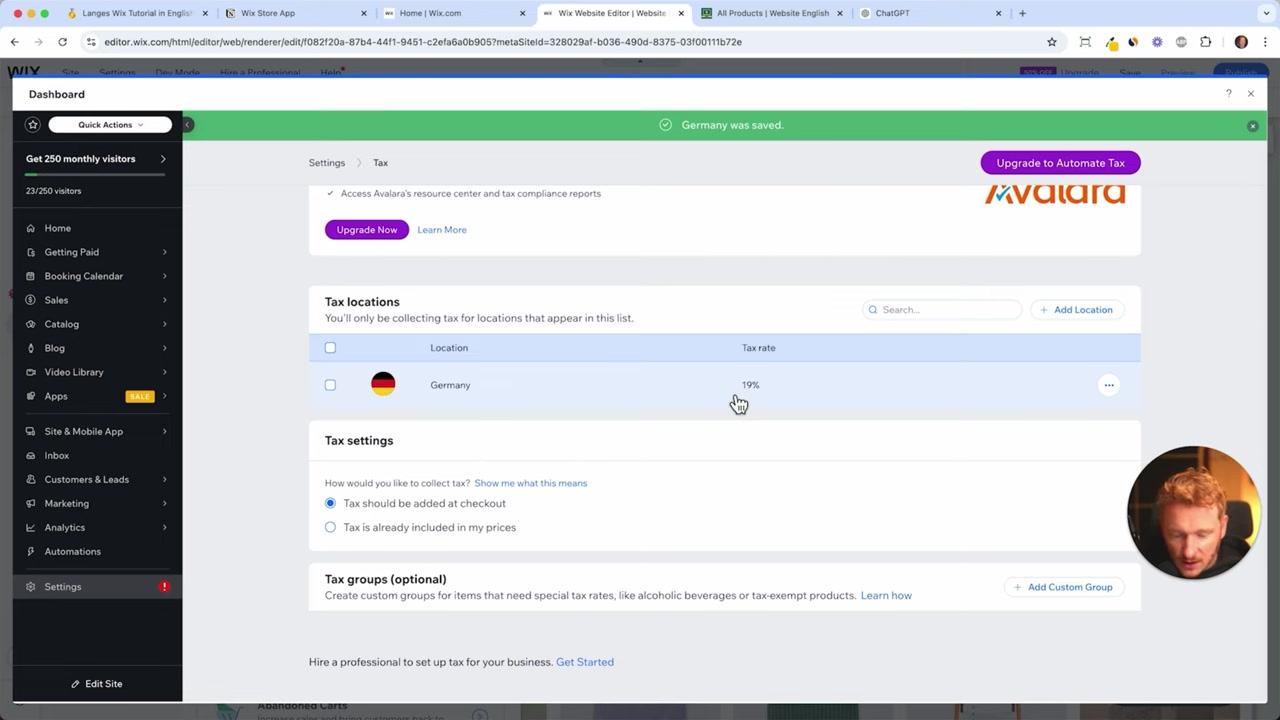
For example, in Germany everything is straightforward — a flat 19% applies across all categories. In the US, however, each state has its own rules, so manual setup gets complicated quickly.
4. Include Tax in the Price vs. Adding It at Checkout
Wix lets you choose when the tax is applied — and the right choice depends on who you're selling to.
B2C (Business to Consumer): Tax is typically already included in the displayed product price. Customers see one clean price and pay that amount.
B2B (Business to Business): Tax is usually added at the end of checkout, on top of the product price. Business buyers expect to see the net price and then have VAT added separately.
Select the option that matches your business model inside the tax settings.
5. Tax Groups for Different Product Types
Wix also supports tax groups, which let you apply different tax rates to different products in the same store.
This is useful if you sell a mix of product types that are taxed at different rates — for example, books versus electronics in some countries. You can assign each product to the appropriate tax group from the product settings.
For most small stores, a single default tax rate will be enough.
6. US Sales Tax: Why You Should Use Avalara or a Tax Consultant
US sales tax is notoriously complex. Every state has its own rate, and some states even have county- or city-level taxes on top of that.
If you're selling to US customers from multiple states, manually tracking all of those rates is impractical. The two best options are:
- Use Avalara — it calculates US state-by-state sales tax automatically and keeps rates up to date.
- Hire a tax consultant — a professional can configure your manual rates correctly and advise you on nexus rules and filing obligations.
Don't guess when it comes to US sales tax. Getting it wrong can create serious compliance issues down the road.
7. What Is Avalara and How Does It Work with Wix?
Avalara is a dedicated tax compliance platform trusted by businesses worldwide. It connects directly to your Wix store and automatically calculates the correct tax amount at checkout based on the buyer's location.
Because Avalara maintains an up-to-date database of tax rates across hundreds of jurisdictions, you don't have to manually update rates whenever a law changes.
For stores selling across multiple US states or into Europe, Avalara is the most reliable way to stay compliant without doing all the research yourself.
8. Do You Really Need to Collect Taxes on Your Wix Store?
Yes — if you're running a legitimate business, collecting and remitting taxes is a legal requirement in most jurisdictions.
Your customers also need to see tax information on their invoices. This is standard practice for both B2C and B2B sales and is often required by law.
Skipping tax setup might seem like one less thing to configure, but it can expose your business to penalties. Get it set up properly from the start.
If you want to learn more about building out the rest of your Wix store, check out the guide on how to add products to your Wix store or how to configure shipping regions.
Frequently Asked Questions
How do I access tax settings in Wix?
What is Avalara and why does Wix use it?
Should I include tax in my product price or add it at checkout?
How does US sales tax work in Wix?
Can I set different tax rates for different products?
Do I need to collect taxes if I'm a small business?
What tax rate should I set for Germany in Wix?
Is Wix tax setup suitable for international stores?
9. Disclosure
Some links in this post may be affiliate links. If you make a purchase through them, a small commission may be earned at no extra cost to you. All content is provided for informational purposes only, without any guarantee of accuracy or completeness. This post does not constitute financial, legal, tax, or investment advice — please consult a qualified professional for your specific situation.
Related Articles

8 Apr 2025
How to Add a New Product to Your Wix Store – Step-by-Step Guide
Ready to start selling on Wix? Adding a new product to your Wix store is straightforward once you know where everything lives. In this guide, we walk through every step — from uploading images and wri...

7 Apr 2025
Wix Online Store: How to Set Up Shipping Regions
Getting shipping right in your Wix store is one of those things that makes a huge difference at checkout. In this tutorial, you'll learn how to define shipping regions, set flat rates, offer free ship...

6 Apr 2025
How to Add Payment Methods to Your Wix Store
Getting paid is the whole point of running an online store. In this guide, you'll learn exactly how to add payment methods to your Wix store — including credit cards, PayPal, Apple Pay, Google Pay, an...