How Much Does Wix Cost? – Wix Pricing Plans Explained
Thinking about building a website with Wix but not sure what it's actually going to cost you? You're not alone — Wix pricing can feel a little confusing at first glance.
In this guide, we walk through every Wix plan, what's included, and the real total cost of running a Wix website or online store — including the hidden fees most people forget about. You can also try Wix for free before committing to any paid plan.
1. What Is Wix and Who Is It For?
Wix is one of the most popular website builders in the world. It lets you create professional websites, blogs, portfolios, and online stores — all without writing a single line of code.
It's a great choice whether you're a freelancer building a portfolio, a small business owner launching a website, or an entrepreneur setting up an online store. The drag-and-drop editor makes it accessible to complete beginners while still being powerful enough for more advanced users.
2. Overview of Wix Pricing Plans
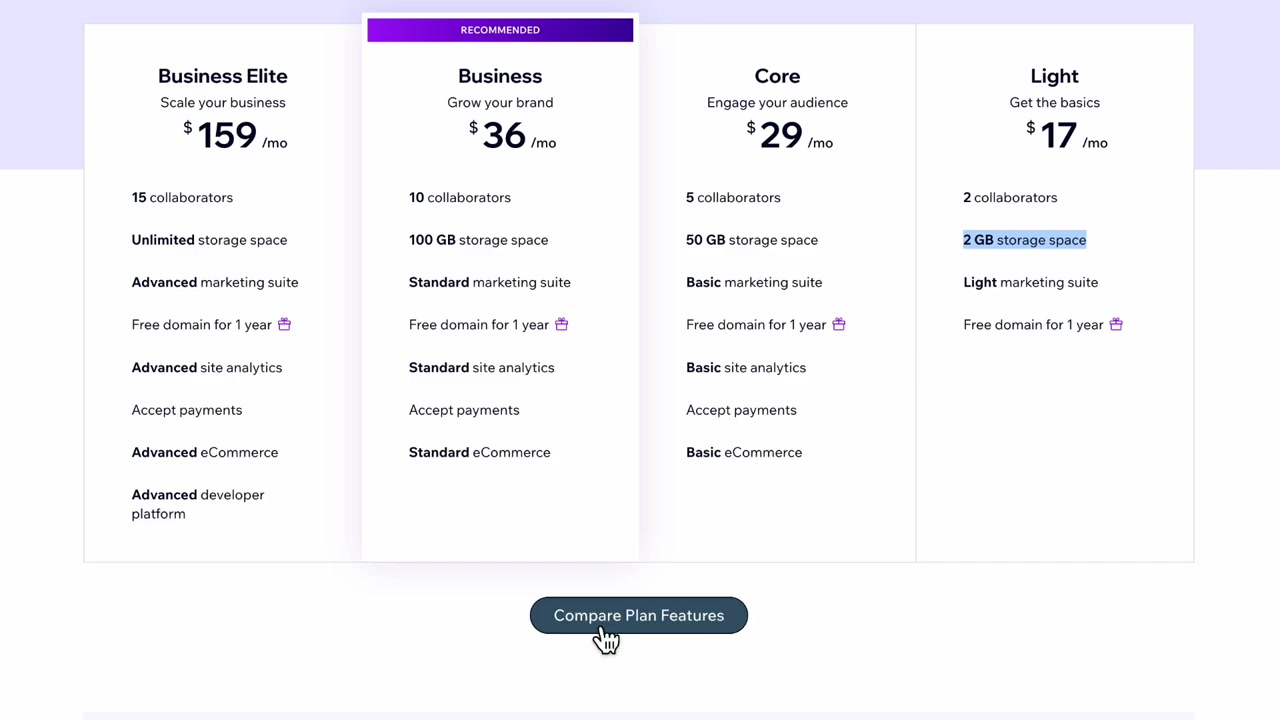
Wix currently offers four paid plans. Here's a quick summary:
| Plan | Monthly Price |
|---|---|
| Light | ~$17/month |
| Core | ~$29/month |
| Business | ~$36/month |
| Business Elite | ~$159/month |
All plans come with a 14-day money-back guarantee, so there's very little risk involved. You can also start completely free via this link and upgrade later if you need to.
3. The Wix Light Plan – Best for Personal Websites
If you just want a personal website, a blog, or a portfolio, the Light plan at around $17/month is the best place to start.
It includes:
- 2 collaborators (you + one other person to manage the site)
- 2 GB of storage — more than enough for images
- A custom domain (free for the first year)
- No Wix branding on your site
You can always upgrade later if your needs grow, so there's no reason to overpay from day one. For most personal or small business websites, the Light plan covers everything you need.
One note on storage: 2 GB is perfectly fine for images, but if you plan to upload videos directly, you'll hit that limit quickly. The easy workaround is to upload your videos to YouTube and embed them on your site — that way storage isn't a concern at all.
4. The Core Plan – Best for Online Stores on Wix
The Core plan at around $29/month is the one to go for if you want to sell products or accept payments online.
This plan unlocks basic e-commerce functionality and, importantly, the ability to accept payments. If you use a booking app, for instance, customers can pay for their appointment upfront — which significantly increases show-up rates.
Looking at the full feature comparison between Core and Business, the differences are fairly minor. Both plans offer custom domains, payment acceptance, and site chat. The Business plan adds a few more collaborators and some extra marketing tools, but for most small stores, Core is the sweet spot.
5. Domain Name Costs for Your Wix Website
Your Wix plan covers the software, but you'll also need a domain name. On Wix, domains typically run between 10 and 45 per year — usually around $20/year for most standard domains.
That works out to about $2/month. Your first year's domain is included free with any paid Wix plan, so you won't feel that cost immediately.
6. Professional Email Address – What It Costs
If you want a professional email like [email protected], Wix pushes you toward Google Workspace.
The starter Google Workspace plan starts at **6/month** (about 72/year). You get 30 GB of storage, Gmail access, Google Drive, and the full suite of Google tools. It's a fair price, even if it's a bit annoying that Wix doesn't offer built-in email hosting.
7. Total Wix Cost – What You'll Actually Pay Per Month
Here's the realistic total cost of running a Wix website when you factor everything in:
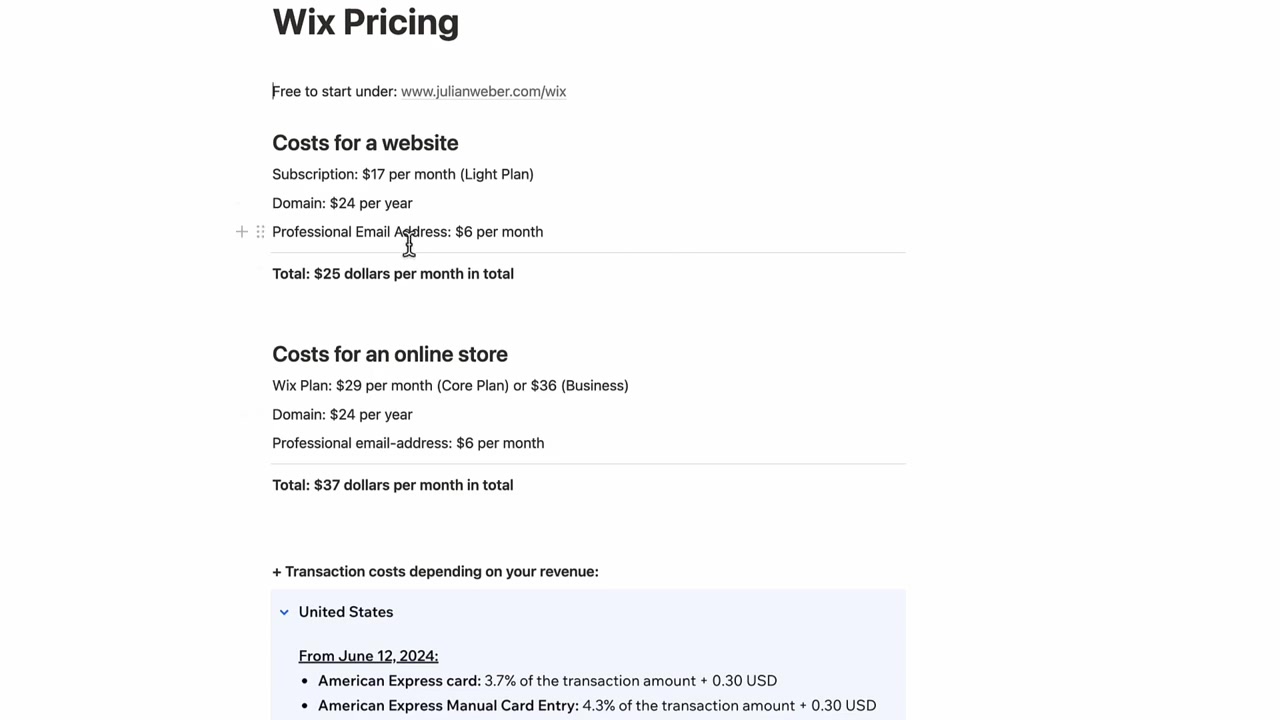
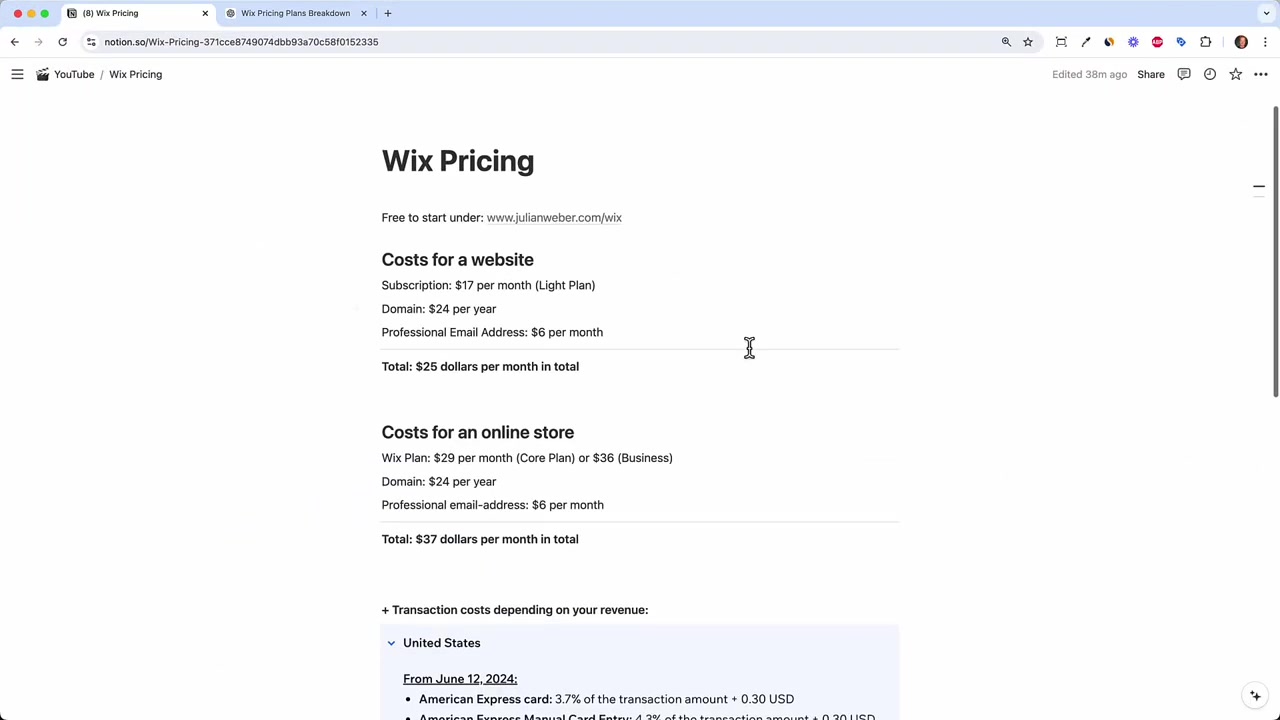
Basic website (Light plan):
- Wix Light plan: $17/month
- Domain: ~$2/month
- Professional email (Google Workspace): $6/month
- Total: ~$25/month
Online store (Core plan):
- Wix Core plan: $29/month
- Domain: ~$2/month
- Professional email: $6/month
- Total: ~$37/month
$25/month for a full professional website is a reasonable price. And you can start for free to test things out before spending anything.
8. Wix Transaction Fees for Online Stores
Here's the part most people overlook: transaction fees. Every online store — whether it's Wix, Shopify, or WooCommerce — charges a fee on every sale.
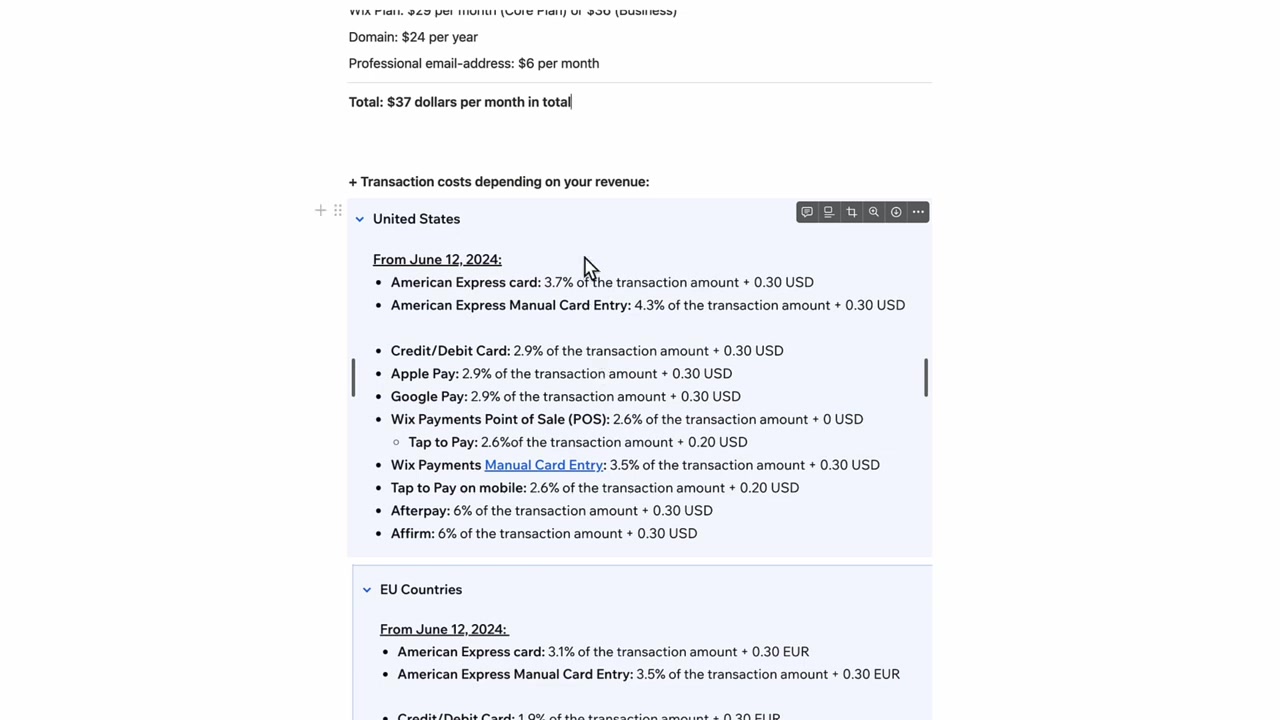
For Wix, the fees depend on your location:
United States:
- Visa / Mastercard: 2.9% + $0.30 per transaction
- Apple Pay / Google Pay: 2.9% + $0.30 per transaction
Europe:
- Visa / Mastercard: 1.9% per transaction
- Apple Pay: slightly lower
- Google Pay: slightly lower
To put this in perspective: if a customer buys a 100 product, you pay **3.20** in fees (2.9% + 0.30). That might not sound like much, but at 10,000/month in revenue, you're looking at roughly $290/month in transaction fees alone — nearly 8x your Wix subscription cost.
Transaction fees are the real cost to watch when running an online store. Make sure to factor them into your pricing strategy from the start.
9. Is Wix Worth the Price?
For most users, yes. At around $25/month for a complete website with a custom domain and professional email, Wix delivers solid value — especially given how beginner-friendly it is.
The drag-and-drop editor, hundreds of templates, built-in SEO tools, and reliable hosting make it one of the easiest ways to get a professional website online without hiring a developer.
If you're running an online store, the Core plan at around $37/month (including domain and email) is a fair entry point. Just keep a close eye on your transaction fees as your revenue grows — that's where your real costs will be.
10. Wix vs Competitors – How Does the Pricing Compare?
Wix sits in the mid-range of website builder pricing. Squarespace starts at a similar price point but is considered slightly less flexible. Shopify's basic plan starts at $39/month and is more focused purely on e-commerce.
For a general-purpose website or small online store, Wix offers a strong balance of features and affordability. The free trial makes it easy to test before committing.
11. Wix Pros and Cons
Pros:
- Very beginner-friendly drag-and-drop editor
- Hundreds of professional templates
- Free trial available
- 14-day money-back guarantee on paid plans
- Good built-in SEO tools
- Flexible enough for websites, blogs, and online stores
Cons:
- Transaction fees can add up quickly for online stores
- Professional email requires a separate Google Workspace subscription
- You can't switch templates after your site is live
- Storage is limited on lower-tier plans (though videos can be embedded from YouTube)
Frequently Asked Questions
Can I use Wix for free?
How much does a Wix domain cost?
Does Wix take a percentage of sales?
What is the cheapest Wix plan?
Do I need a Google Workspace account for Wix?
Is there a money-back guarantee with Wix?
Which Wix plan is best for an online store?
Can I switch Wix plans later?
12. Disclosure
Some links in this post are affiliate links. If you make a purchase through them, a small commission may be earned at no extra cost to you. All content is provided for informational purposes only — no guarantees are made regarding pricing accuracy, as Wix may change its plans at any time. This post does not constitute financial, legal, tax, or investment advice.
Related Articles

28 Apr 2026
How to Redesign Your Website with AI (Free & No Code)
Is your website looking dated? In this tutorial from the Julian Weber channel, you'll see how to completely redesign an old website into a clean, modern, and high-converting page — in under 10 minutes...

10 May 2026
Gamma AI Website Builder Tutorial (2026) – Build a Website in Minutes
Most people know Gamma AI for its slick presentations — but did you know it can also build full websites? In this tutorial from the Julian Weber channel, you'll see exactly how to go from a blank prom...

25 Aug 2025
Gamma AI Tutorial 2026 – How to Use Gamma AI for Presentations
Tired of spending hours on PowerPoint slides? Gamma AI lets you create professional, animated presentations in just a few minutes — all you need is a prompt. In this tutorial, you'll see exactly how t...