Wix Premium Plans - How To Buy A Wix Premium Plan?
Ready to connect your own custom domain to your Wix website? To do that, you'll need to upgrade to a Wix Premium plan. In this guide, we walk you through the entire process — from starting your free trial to completing your purchase — so you can get your site live with your own domain as quickly as possible. You can get started with Wix for free using this link.
1. What Is a Wix Premium Plan?
Wix offers a free plan that lets you build and publish a website — but it comes with limitations. You'll get a Wix-branded subdomain (like yourname.wixsite.com/home) and Wix ads will appear on your pages.
Upgrading to a Premium plan removes those limitations. You get a custom domain, no Wix branding, more storage, and access to advanced features like e-commerce and analytics tools.
In short: the free plan is great for testing and learning, but a Premium plan is what you need for a professional online presence.
2. Start Wix for Free Before You Upgrade
Before spending any money, it makes sense to explore Wix on the free plan first. Head to Wix, enter your email address, and start your free trial instantly.
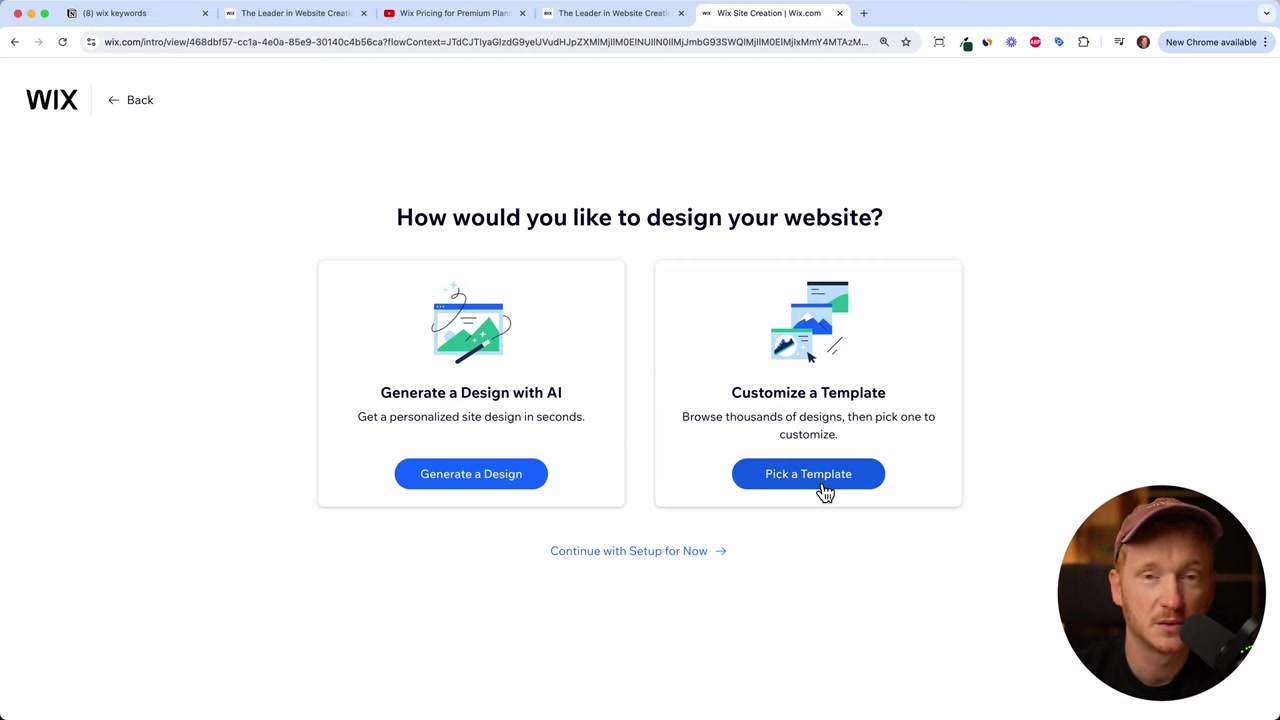
Once inside, Wix will introduce you to its AI assistant — you can describe your website idea in a chat and let the AI generate a starting point. Or you can simply skip that step and go straight to the template library.
Templates are completely free to use. Whether you're building a portfolio, an agency site, or a blog, there are hundreds of polished templates to choose from.
3. When Do You Actually Need to Upgrade?
You can edit text, upload images, and even collect contact form submissions on the free plan. The wall you hit is the custom domain.
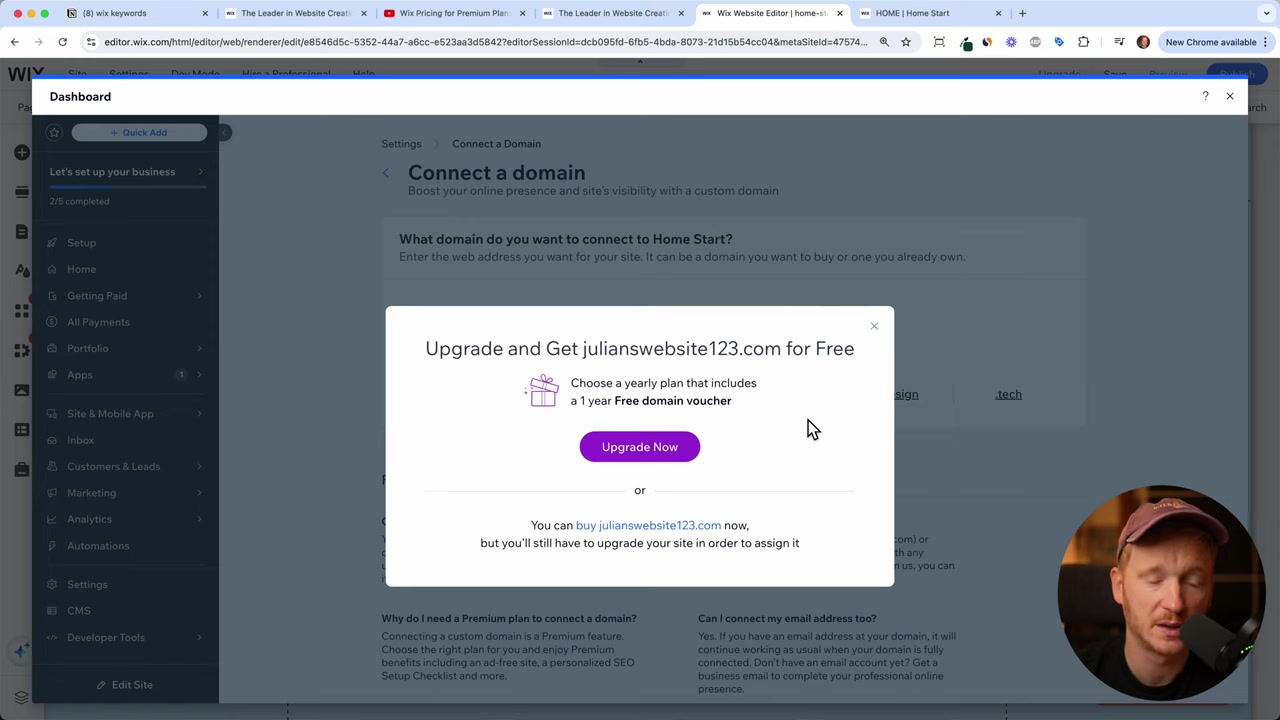
When you try to connect your own domain (like yourwebsite.com), Wix will prompt you to upgrade. This is the most common trigger for most users to move to a paid plan.
If you also need to accept payments or run an online store, you'll need at least the Core plan. More on that below.
4. Wix Premium Plans Compared
Wix currently offers four Premium plans. Here's a quick breakdown:
Light — The entry-level plan. Includes 2 collaborators, 2 GB of storage, a free domain for one year, and a basic marketing suite. Best for simple personal or portfolio sites.
Core — Adds basic e-commerce functionality so you can accept payments. Comes with 5 collaborators and a free domain. This is the plan to start with if you plan to sell anything.
Business — Designed for growing businesses. Includes standard e-commerce, 10 collaborators, 100 GB of storage, and a free domain. Priced around $40/month.
Business Elite — The top-tier plan for advanced needs, with priority support, unlimited storage, and the most powerful e-commerce tools.
All plans include a custom domain, no Wix branding, and 24/7 customer support. You also get a 14-day money-back guarantee on every plan.
5. How Much Does Wix Cost?
Pricing varies by region and billing cycle. As a rough guide based on September 2024 pricing:
- Light: the most affordable entry point
- Core: around €26/month (similar in USD)
- Business: around €40/month
The smart move is to choose a longer billing cycle. Paying monthly is the most expensive option. Committing to two years gives you the biggest savings per month. If you want to minimize costs, go for the two-year plan upfront.
6. How to Buy a Wix Premium Plan Step by Step
Here's the exact process to purchase your plan:
Step 1 — Open the upgrade prompt From your Wix dashboard, click Design Website, then try to connect your own domain. Wix will automatically prompt you to upgrade.
Step 2 — Choose your plan Review the four plans and pick the one that fits your needs. If you don't need e-commerce, start with the Light plan. If you need to take payments, go Core or higher.
Step 3 — Select your billing cycle Choose between monthly, yearly, or two-year billing. The longer the commitment, the lower your monthly rate.
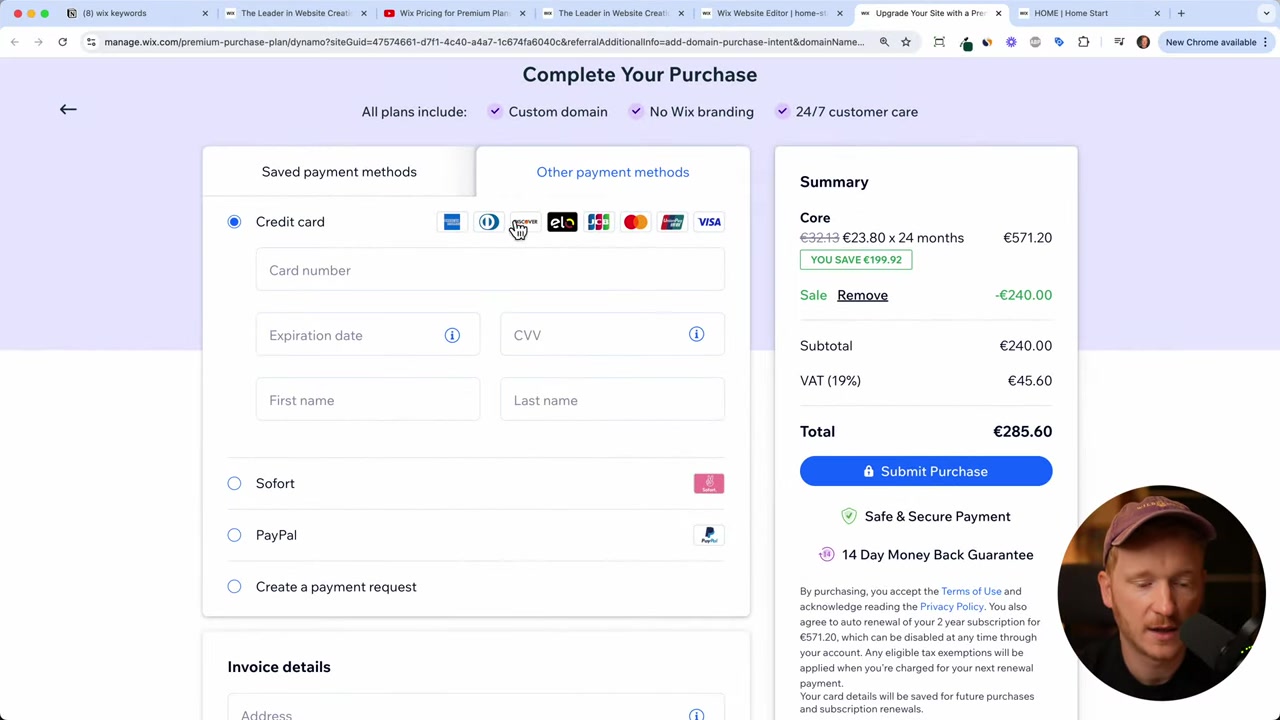
Step 4 — Enter payment details Wix accepts Visa, Mastercard, American Express, Union Pay, JCB, and PayPal. Depending on your country, you may also see local payment options.
Step 5 — Fill in your invoice details Enter your address, city, state, phone number, and VAT number if applicable.
Step 6 — Complete the purchase Click to confirm. Wix will automatically upgrade your account and begin processing your custom domain. Domain activation can take up to 24 hours.
7. Getting Your Custom Domain Through Wix
All Premium plans include a free domain for the first year. When you connect or register a domain through Wix, they handle the registration process automatically.
Just type in the domain name you want during checkout. If it's available, Wix will claim it for you as part of your plan.
Once the domain is live (within 24 hours), you can use it everywhere — your Instagram bio, YouTube channel, business cards, and ad campaigns.
8. Is Wix Good for Beginners?
Yes — Wix is one of the most beginner-friendly website builders available. The drag-and-drop editor requires zero coding knowledge, and the free template library means you can have a professional-looking site up in an hour.
The AI assistant is also a helpful starting point if you're not sure where to begin. Just describe what your site is about and it will generate an initial layout for you.
If you want a deeper look at how the editor works, check out this full Wix tutorial for more detail on building and customizing your site.
9. Wix Free vs Premium — Key Differences
Here's a quick side-by-side of what changes when you upgrade:
| Feature | Free | Premium |
|---|---|---|
| Custom domain | ✗ | ✓ |
| Wix ads on site | ✓ | ✗ |
| Storage | 500 MB | 2 GB+ |
| E-commerce | ✗ | Core and above |
| Free domain (1 year) | ✗ | ✓ |
| 24/7 support | ✗ | ✓ |
| Money-back guarantee | — | 14 days |
The free plan is genuinely useful for learning the platform. But for anything public-facing or professional, a Premium plan is the right call.
10. Tips for Getting the Best Value on Wix
Start small, then upgrade. The Light plan is a perfectly valid starting point. You can always move up to Core or Business later — Wix makes it easy to upgrade or downgrade at any time.
Pick a longer billing cycle. Two-year plans offer the most savings. If you're confident in your project, locking in the longer term makes financial sense.
Use the 14-day money-back guarantee. If you upgrade and realize Wix isn't right for you, contact support within 14 days for a full refund. There's no risk in trying.
For more information on Wix pricing and how to get the best deal, check out this guide on Wix promo codes.
Frequently Asked Questions
Do I need a Premium plan to use Wix?
Can I cancel my Wix Premium plan?
Which Wix plan is best for selling products online?
Does Wix include a free domain?
How long does it take for my Wix domain to go live?
Can I switch between Wix Premium plans?
What payment methods does Wix accept?
Is there a difference between Wix yearly and monthly billing?
11. Disclosure
Some links in this post are affiliate links. If you make a purchase through them, a small commission may be earned at no extra cost to you. All content is provided for informational purposes only and no guarantees are made regarding accuracy or completeness. This post does not constitute financial, legal, tax, or investment advice.
Related Articles

15 Dec 2025
Wix Promo Code 2026 – How to Save on Wix Premium Plans
If you've been thinking about upgrading to a Wix premium plan, timing your sign-up the right way can make a real difference. In this guide, I'll walk you through the exact method to access the best av...

21 Sep 2024
Wix Accept Payments - How To Add Payment Methods On Wix Websites in 2026
Getting paid is the whole point of running an online store — so setting up your payment methods correctly from day one is essential. In this tutorial, you'll learn exactly how to connect credit cards,...

28 Sep 2024
Nuovo Wix Tutorial - Come Creare un Sito Web di Portfolio con Wix
Vuoi mostrare il tuo lavoro online in modo professionale? In questo tutorial imparerai a creare un sito web di portfolio con Wix passo dopo passo — che tu sia un designer, un fotografo, un artista o u...