Webador Pricing Explained – How Much Does the Webador Pro Plan Cost?
If you're thinking about building a website with Webador, the first question on your mind is probably: how much does it actually cost? This guide walks you through every Webador pricing plan — Free, Lite, Pro, and Business — so you can figure out which one fits your goals and budget.
Want to skip straight to trying it out? You can sign up for Webador for free and explore everything before committing to a paid plan.
1. What is Webador?
Webador is a beginner-friendly website builder that lets you create a website, blog, or online store without any coding knowledge. It's designed to be simple and straightforward — great if you want to get online quickly without a steep learning curve.
That said, it's worth knowing upfront that Webador is a basic builder. If you need advanced e-commerce features or highly customized designs, platforms like Shopify or Wix may be a better fit. But for most beginners, Webador does the job well.
2. Overview of All Webador Plans
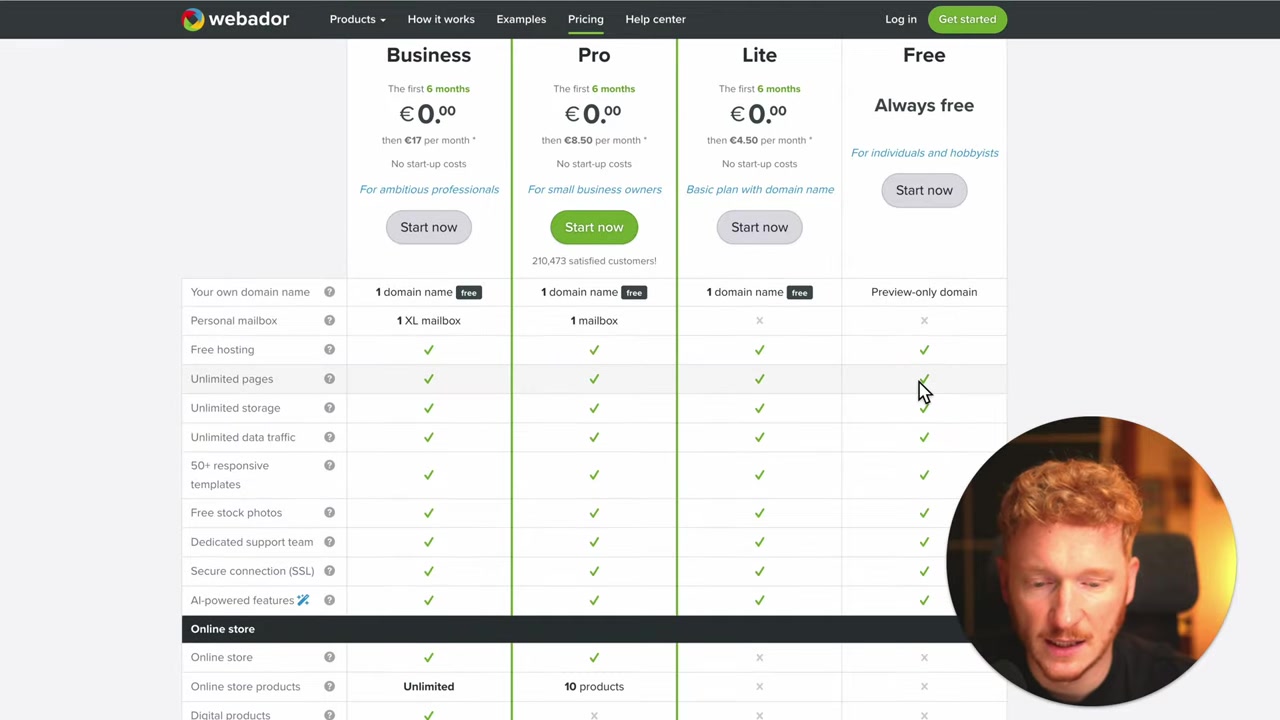
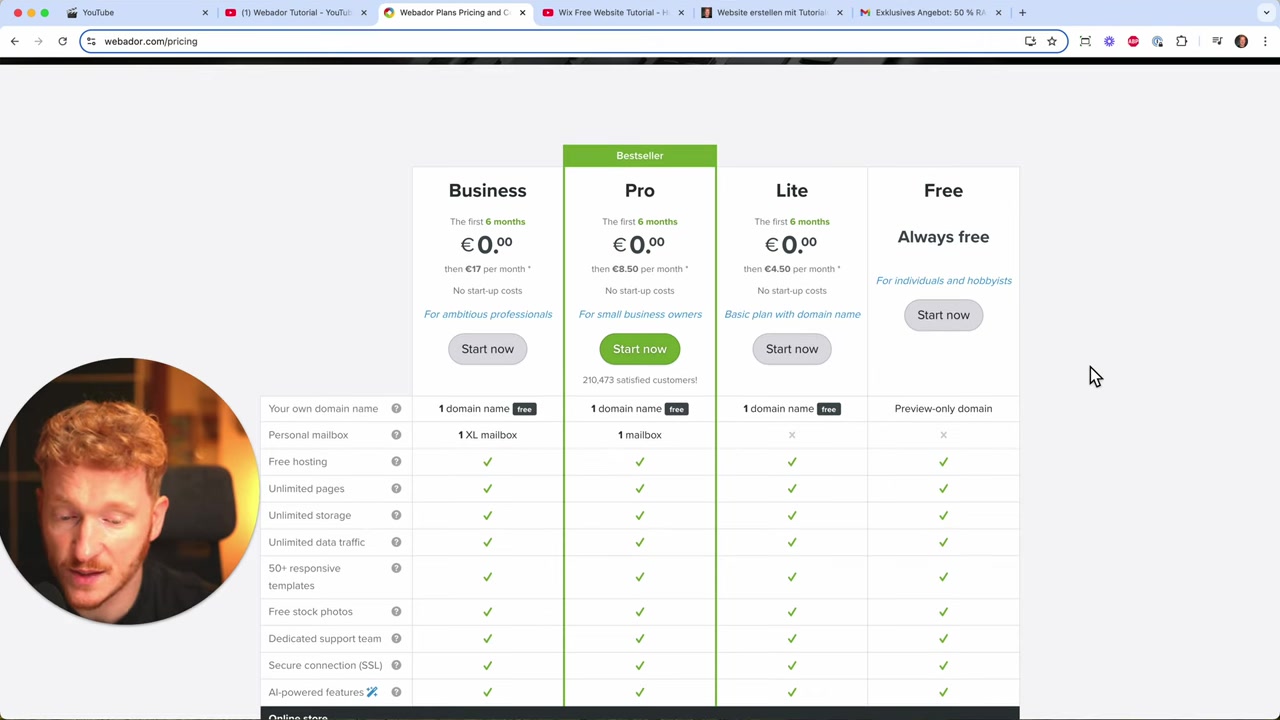
Webador offers four pricing tiers. Here's a quick breakdown before we dive into the details:
- Free — Basic website with no custom domain
- Lite — Adds a custom domain connection
- Pro — Adds a mailbox and a small online store (up to 10 products)
- Business — Unlimited products and a larger mailbox
The pricing is refreshingly simple. No hidden fees, no complicated feature matrices.
3. The Free Plan – What Do You Get for Nothing?
The Webador free plan is surprisingly generous. You get:
- Free hosting
- Unlimited pages
- Unlimited storage
- Responsive templates
- Free stock photos
- SSL certificate (so your site is secure)
The main catch? You don't get a custom domain. Your site will live on a subdomain like yourname.webador-website.com, which doesn't look very professional. But it's a great way to start building and see if you like the platform before spending a cent.
4. The Lite Plan – Connect Your Own Domain
The Lite plan's biggest advantage over the free plan is the ability to connect your own custom domain — making your website look far more professional.
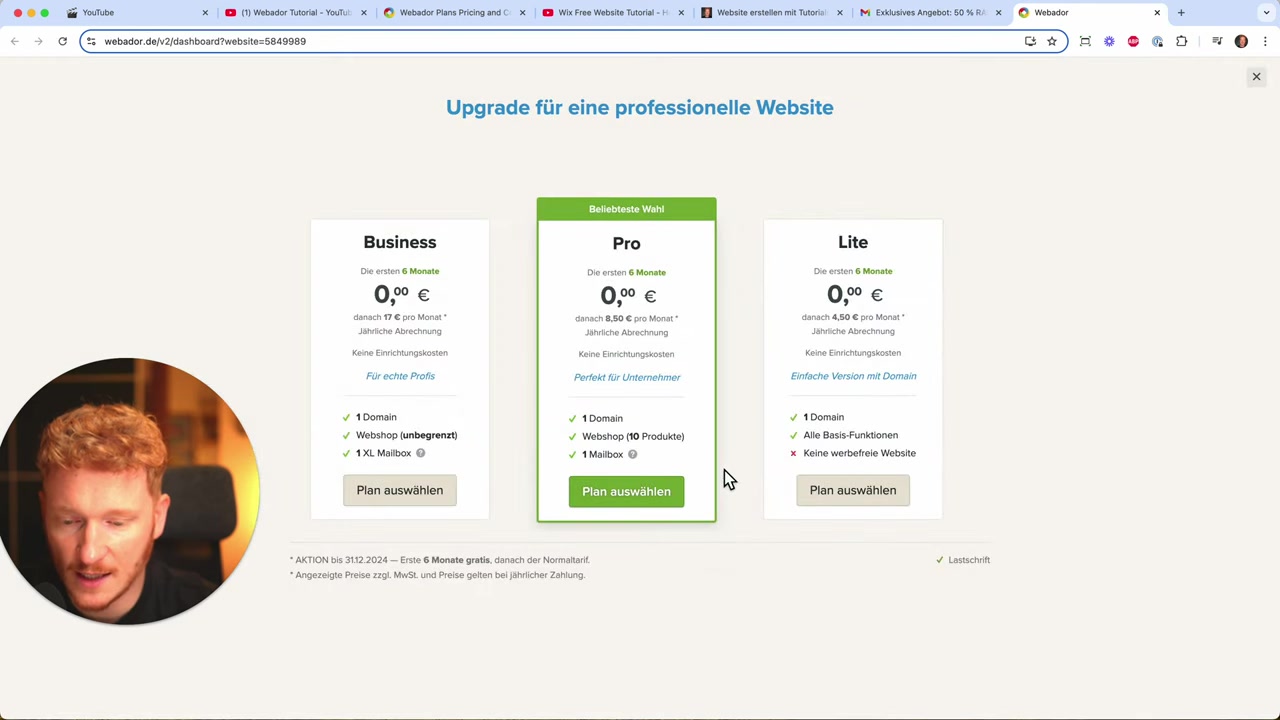
If you choose the yearly plan, you get the first six months free on Lite, Pro, and Business. After that introductory period, the Lite plan runs roughly $5/month (prices may vary slightly by region).
However, the Lite plan does not include a mailbox or any e-commerce functionality. If you need those, you'll want the Pro plan.
5. The Webador Pro Plan – Is It Worth It?
The Pro plan is where things get interesting. On top of everything in Lite, you get:
- A free domain included
- A professional mailbox (e.g., [email protected]) with 1 GB storage
- An online store with up to 10 products
- Google Analytics integration
- Google Business Profile support
- Unlimited photo albums
- Custom favicon
- Block functionality for flexible page layouts
The Pro plan costs approximately $8–10/month after the introductory period. That's remarkably affordable for a plan that includes e-commerce — most website builders charge significantly more to let you sell products online.
6. The Business Plan – For Serious Online Stores
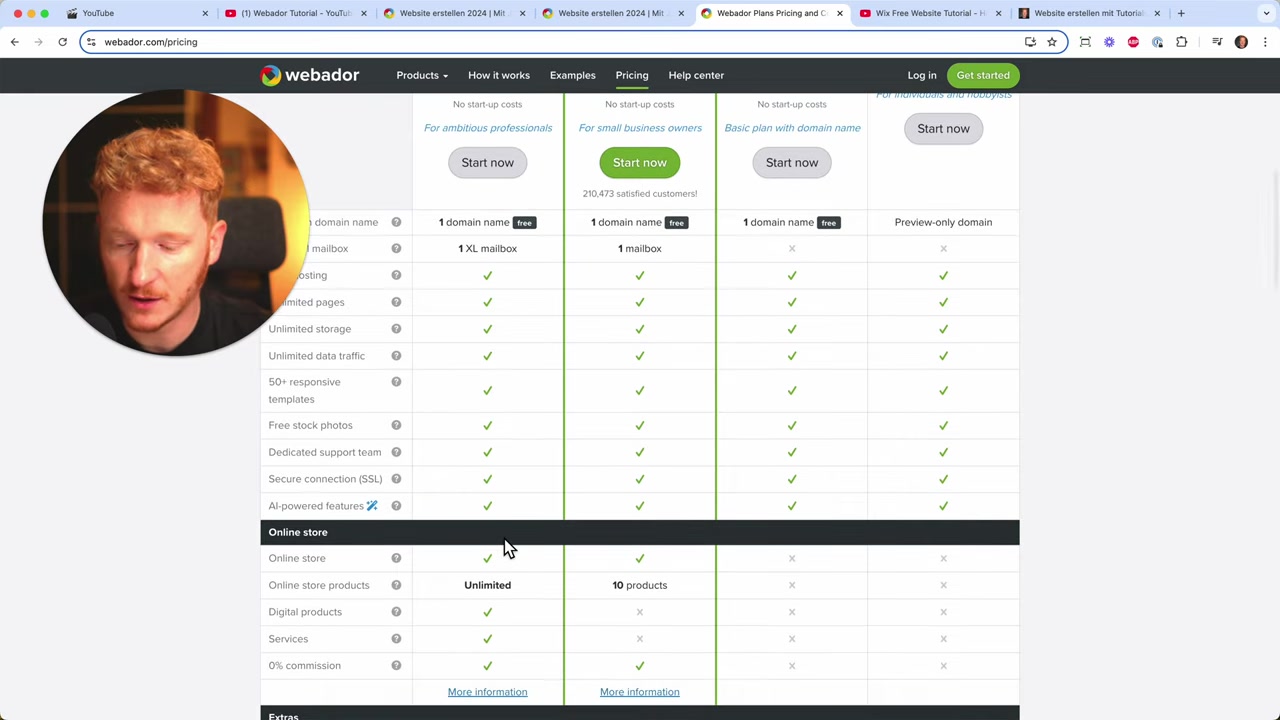
The Business plan is essentially the Pro plan with two key upgrades:
- Unlimited products in your online store (vs. 10 on Pro)
- XL mailbox with 10 GB of storage (vs. 1 GB on Pro)
It costs around $17–20/month. If you're running a serious shop with a large catalog, the Business plan makes sense. For most small businesses or personal sites, the Pro plan will do just fine.
7. How Much Does Webador Cost? – Plan Comparison
Here's a side-by-side summary of what each Webador plan offers:
| Feature | Free | Lite | Pro | Business |
|---|---|---|---|---|
| Custom domain | ✗ | ✓ | ✓ | ✓ |
| Free domain included | ✗ | ✗ | ✓ | ✓ |
| Mailbox | ✗ | ✗ | 1 GB | 10 GB |
| Online store | ✗ | ✗ | 10 products | Unlimited |
| SSL certificate | ✓ | ✓ | ✓ | ✓ |
| Approx. monthly price | Free | ~$5 | ~$8–10 | ~$17–20 |
Prices are approximate and may vary by region. The first six months are free on all paid plans when choosing the yearly billing option.
For an even deeper look at Webador's plans, check out the Webador free plan guide on this blog.
8. Is Webador Good for Beginners?
Yes — Webador is specifically built for beginners. The editor is drag-and-drop friendly, the templates are clean and responsive, and the pricing is transparent.
You don't need any technical knowledge to get started. Just sign up, pick a template, and start customizing. The free plan lets you practice without any financial risk.
9. Webador vs. Wix – Which Should You Choose?
Webador and Wix both let you build websites without coding, but they target slightly different users.
Webador is simpler, faster to set up, and very affordable — especially for small stores. It's ideal if you want something up and running quickly.
Wix is more powerful and flexible, with a much larger app marketplace and more advanced design options. It's a better fit if you need more customization or plan to grow a more complex site over time.
For a complete beginner who just needs a clean, functional website or a small shop, Webador is a solid choice. If you anticipate needing more features down the road, Wix is worth exploring — you can also try Webador for free and see how it feels before deciding.
10. Webador Pros and Cons
Pros:
- Very beginner-friendly
- Transparent, affordable pricing
- Free plan available with no time limit
- E-commerce included on the Pro plan at a low price
- First six months free on yearly plans
Cons:
- Limited compared to advanced builders like Wix or Shopify
- No digital product sales even on paid plans
- Pro plan store is capped at 10 products
- Subdomain on free plan looks unprofessional
11. How to Start Building Your Webador Website for Free
Getting started with Webador is straightforward:
- Visit Webador and click Start now
- Choose whether you want a website, online store, or blog
- Pick a template
- Start customizing — no credit card required
You can stay on the free plan as long as you like and upgrade whenever you're ready. If you want a step-by-step walkthrough of building your first site, check out the Webador free website tutorial.
Frequently Asked Questions
Is Webador really free?
How much does the Webador Pro plan cost?
What is the difference between the Webador Lite and Pro plans?
Can I sell products on Webador?
Does Webador include a free domain?
Is Webador good for e-commerce?
How does Webador compare to Wix?
Can I upgrade from the Webador free plan later?
12. Disclosure
Some links in this post are affiliate links. If you click through and make a purchase, a small commission may be earned at no extra cost to you. All content is provided for informational purposes only and comes without any guarantee of accuracy or completeness. Nothing in this post constitutes financial, legal, tax, or investment advice.
Related Articles

6 Feb 2025
Webador Free – Create a Stunning Website Without Spending a Dime
Did you know you can build and publish a real website with Webador completely for free? The free plan exists, but it's a little tricky to find — and even trickier to actually publish without being pus...

15 Dec 2025
Wix Promo Code 2026 – How to Save on Wix Premium Plans
If you've been thinking about upgrading to a Wix premium plan, timing your sign-up the right way can make a real difference. In this guide, I'll walk you through the exact method to access the best av...
10 Feb 2025
Webador Website Maken – Nederlandstalige Tutorial voor Beginners
Wil je een mooie website maken zonder ook maar één regel code te schrijven? In deze tutorial laat ik je stap voor stap zien hoe je met Webador een professionele website bouwt. Van het kiezen van een s...