How to Sell My Online Business – Get a Free Valuation on Flippa (2026)
Thinking about selling your online business but not sure what it's actually worth? In this tutorial, Julian Weber walks you through how to use Flippa — one of the world's largest marketplaces for buying and selling online businesses — to get a free, AI-powered valuation in minutes.
Whether you run an e-commerce store, a blog, a SaaS product, or an affiliate site, this guide will show you exactly how the process works from start to finish.
1. What Is Flippa?
Flippa is one of the biggest online marketplaces dedicated to buying and selling digital businesses. Think of it as the eBay for online businesses.
It supports sellers and buyers in multiple countries and languages, with over 400,000 weekly active buyers browsing the platform at any given time.
Flippe specialises in websites, e-commerce stores, AdSense sites, SaaS products, apps, domains, YouTube channels, and social media accounts. If it exists online, there's a good chance you can sell it on Flippa.
2. Why Use Flippa Instead of ChatGPT to Value Your Business
You might be tempted to ask ChatGPT what your business is worth — and yes, it can give you a rough answer. But it isn't built for this.
Flippe's valuation tool is powered by AI that's connected to real transaction data from thousands of completed business sales. That means it can give you industry-specific multiples based on actual buyer behavior — not just a generic estimate.
It takes into account your business model, revenue, costs, marketing channels, and even the age of your business. That level of detail simply isn't available in a general-purpose AI chatbot.
3. How to Get a Free Business Valuation on Flippa
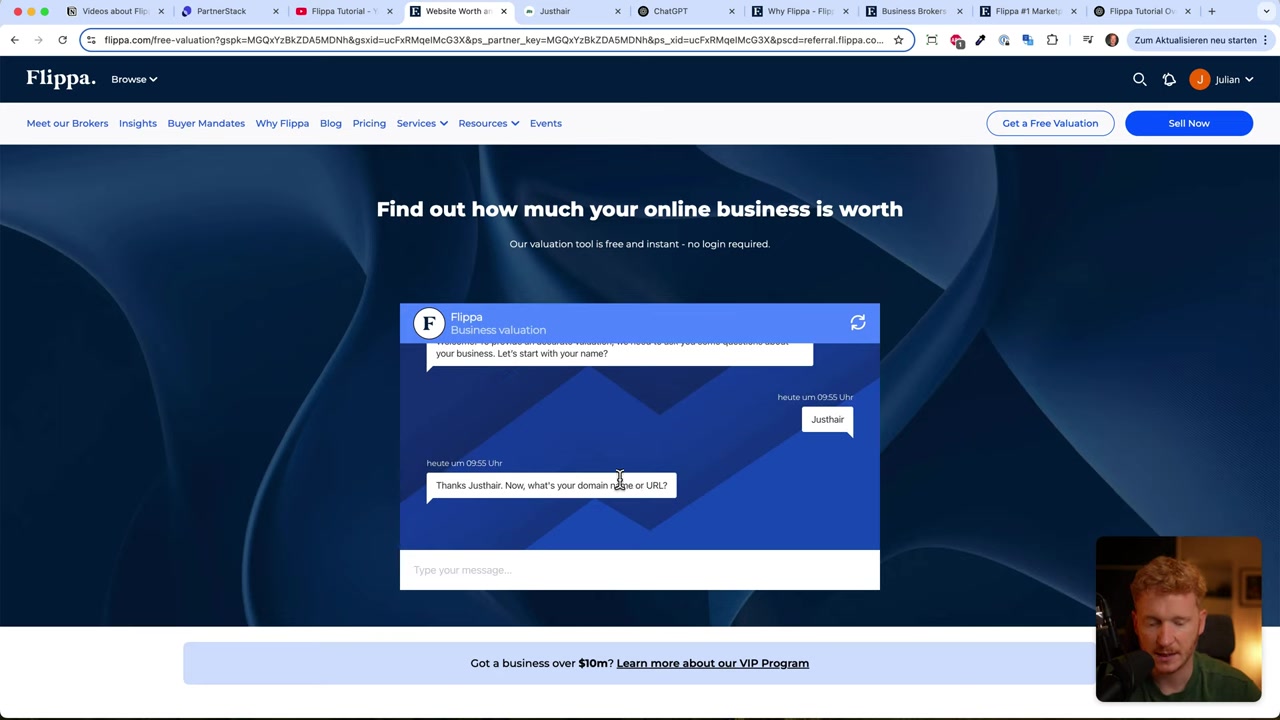
Getting your free valuation is straightforward. Head to Flippa using the free valuation link and you'll land directly on their AI-powered chat tool.
Here's what the questionnaire covers:
Step 1 — Basic Business Info
Enter your business name and website URL. Then select the year you started the business. This helps Flippa factor in the age of your brand when calculating the valuation.
Step 2 — Business Model
Choose your business category: e-commerce, SaaS, content/blog, Amazon FBA, app, domain, or something else. Then select your primary monetisation method — for example, shipping physical goods, subscriptions, ad revenue, etc.
Step 3 — Financial Details
This is where Flippa gets specific. You'll be asked for:
- Average order value
- Refund rate
- Number of customers
- Revenue over the last 12 months
- Total annual expenses
In the video example, a hair growth e-commerce store on Shopify with €480,000 in annual revenue and €200,000 in costs was entered. This level of detail is what makes the estimate far more accurate than a generic tool.
Step 4 — Marketing & Growth
Flippe asks how you acquire customers — SEO, paid ads, social media, etc. This factors into the attractiveness of the business to potential buyers.
Step 5 — Your Contact Details
To receive your valuation, you'll need to enter your email address and phone number. This is expected — Flippa uses this to match you with relevant buyers and brokers.
4. Understanding Your Flippa Valuation Results
Once you complete the questionnaire, you land on your personal Flippa dashboard where your valuation is displayed.
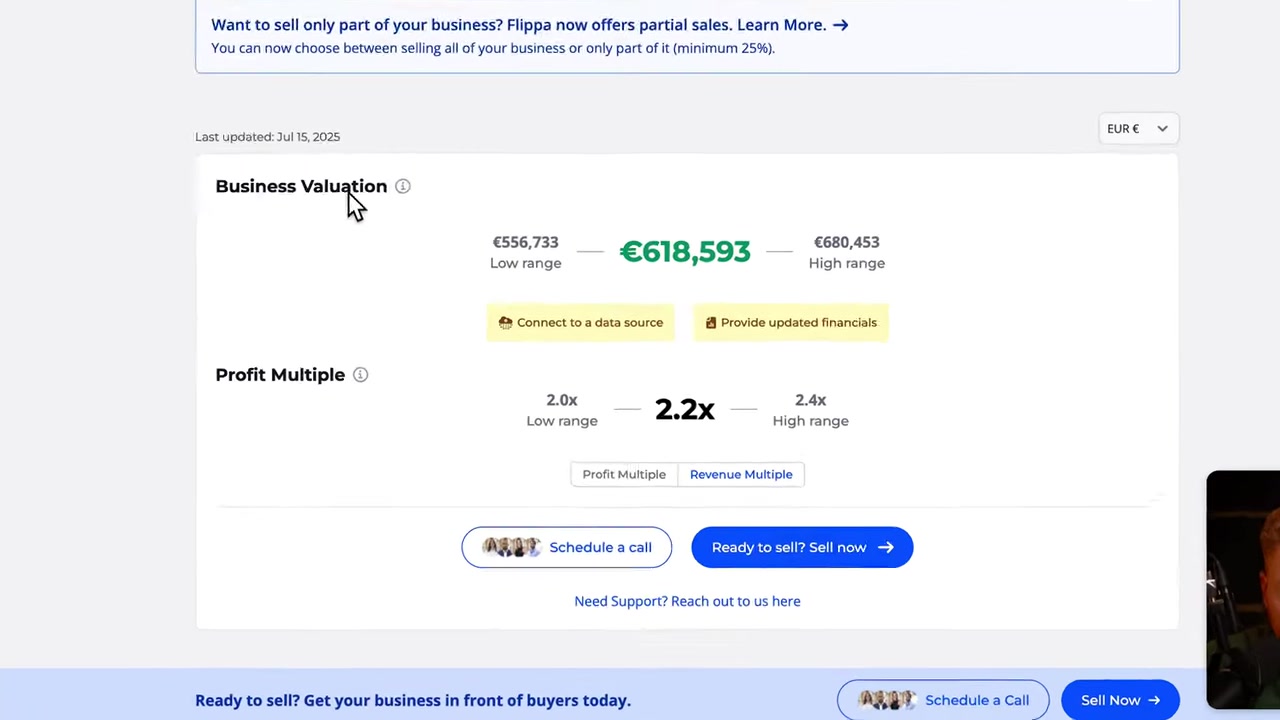
In the example from the video, the Shopify hair store received a valuation of €618,000, with a low range of €500,000 and a high range of €680,000.
Flippa shows two key metrics:
- Profit multiple — your annual profit multiplied by an industry-standard factor (in this case, 2.2×)
- Revenue multiple — your annual revenue multiplied by a lower factor (1.3×)
These multiples are based on real e-commerce sale data, making them a reliable benchmark for what buyers are actually willing to pay.
5. Connecting With Buyers on Flippa
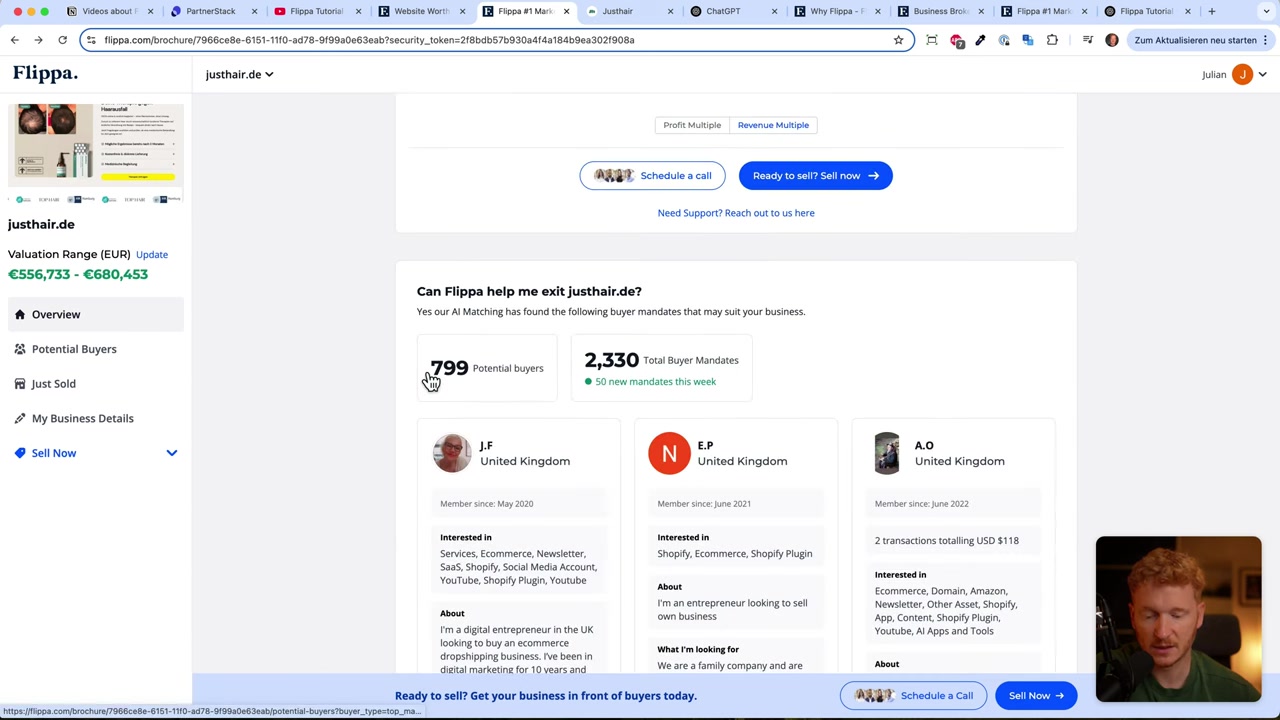
Once your valuation is ready, Flippa immediately shows you how many matched buyers are already on the platform. In the video example, 799 potential buyers were found for that specific business profile.
You can browse buyer profiles, see their interests and budgets, and connect with them directly through the platform.
Flippa also lets you connect your data sources — Google Analytics, Shopify, Amazon Seller Central — so that buyers can verify your numbers are real. Verified data significantly increases buyer confidence and can help you command a higher price.
6. Listing Your Business for Sale on Flippa
When you're ready to actually list, Flippa gives you two options:
- Auction — set a starting price and let buyers bid
- Fixed asking price — name your price and wait for interested buyers
You fill in your business details, connect your data, and Flippa puts your listing in front of its large buyer network.
Flippa also offers access to business brokers who work globally — including in Europe, the US, and Asia — to help you negotiate and close the deal. If you want professional support throughout the sale, this is a major advantage.
7. What Types of Online Businesses Can You Sell on Flippa?
Flippa covers a wide range of digital assets. Here's what you can sell:
- E-commerce stores (Shopify, WooCommerce, custom)
- Amazon FBA businesses
- SaaS products and apps
- Content websites and blogs
- AdSense and affiliate sites
- Domains
- YouTube channels
- Social media accounts
Essentially, if it generates revenue online, Flippa can help you find a buyer for it.
8. Is Flippa Good for First-Time Sellers?
Yes — Flippa is designed to be accessible for first-time sellers. The free valuation tool walks you through the entire process step by step, so you don't need any prior experience in mergers and acquisitions.
The platform also gives you a clear starting point: know your numbers, connect your data, and choose your listing format. Their broker network is there if you need extra support.
That said, it helps to go in with realistic expectations. The valuation tool gives you a range, not a guaranteed price. Final sale values depend on buyer interest, negotiation, and how well your data is verified.
9. How Much Does It Cost to Sell on Flippa?
The valuation itself is completely free. You don't pay anything to find out what your business is worth.
Flippe charges fees when a sale is completed — typically a success fee based on the transaction value. The exact fee structure depends on the size of your deal and whether you use a broker.
It's worth checking the current fee schedule directly on Flippa's website before listing, as these can be updated.
10. Flippa vs Other Business Marketplaces
There are a few other platforms where you can sell online businesses — Empire Flippers, FE International, and Acquire.com are among the well-known alternatives. Here's how Flippa compares:
- Flippa — best for a wide range of business sizes and types, large buyer pool, free valuation tool, accessible for smaller businesses
- Empire Flippers — more curated, focuses on larger, established businesses with higher revenue thresholds
- FE International — boutique broker model, high-end deals, more hands-on but slower process
- Acquire.com — focused on SaaS and tech startups
For most solo founders and small business owners looking to sell for the first time, Flippa's combination of a free valuation tool, large buyer pool, and broker support makes it a strong starting point.
Frequently Asked Questions
Is Flippa's valuation tool really free?
How accurate is Flippa's business valuation?
What information do I need to get a valuation on Flippa?
Can I sell my Shopify store on Flippa?
How long does it take to sell a business on Flippa?
Can I sell a YouTube channel or social media account on Flippa?
Do I need a broker to sell on Flippa?
What is a profit multiple and why does it matter when selling a business?
11. Disclosure
Some links in this post are affiliate links. If you click through and make a purchase, a small commission may be earned at no extra cost to you. All content is provided for informational purposes only — no guarantee of results is given. Nothing in this post constitutes financial, legal, tax, or investment advice.
Related Articles

28 Oct 2025
How to Create a TikTok Ads Account in 2026
Want to run ads on TikTok but not sure where to start? Setting up your TikTok Ads Manager account is easier than you think — and it only takes a few minutes. In this guide, I'll walk you through the e...

15 Dec 2025
Wix Promo Code 2026 – How to Save on Wix Premium Plans
If you've been thinking about upgrading to a Wix premium plan, timing your sign-up the right way can make a real difference. In this guide, I'll walk you through the exact method to access the best av...

26 May 2026
How to Add Signature in Gmail (Tutorial 2026)
Want to make your emails look polished and professional? A well-designed Gmail signature can make a huge difference. In this tutorial, Julian Weber walks you through everything — from creating a basic...