How to Scan QR Code on Revolut – Quick Tutorial
Need to scan a QR code inside the Revolut app but can't find the scanner? You're not alone. In this quick tutorial, you'll learn exactly where the QR code scanner is hidden in Revolut and how to use it to send or receive money in seconds. Whether you're paying an invoice or getting paid by a friend, Revolut makes it surprisingly easy once you know where to look.
1. What Is the Revolut QR Code Scanner?
Revolut's built-in QR code scanner lets you send and receive money without manually typing in bank details or a Revolut tag. It reads payment QR codes and automatically pre-fills all the required information for you.
This is especially handy when paying invoices, splitting bills, or accepting payments from customers — no copy-pasting needed.
2. Open the Revolut QR Code Scanner
Start on the home screen of the Revolut app. Tap Payments in the bottom navigation bar — it's the middle button at the bottom of the screen.
Once you're on the Payments screen, tap the + (plus) icon in the upper right corner. A menu will appear giving you several options for adding a recipient.
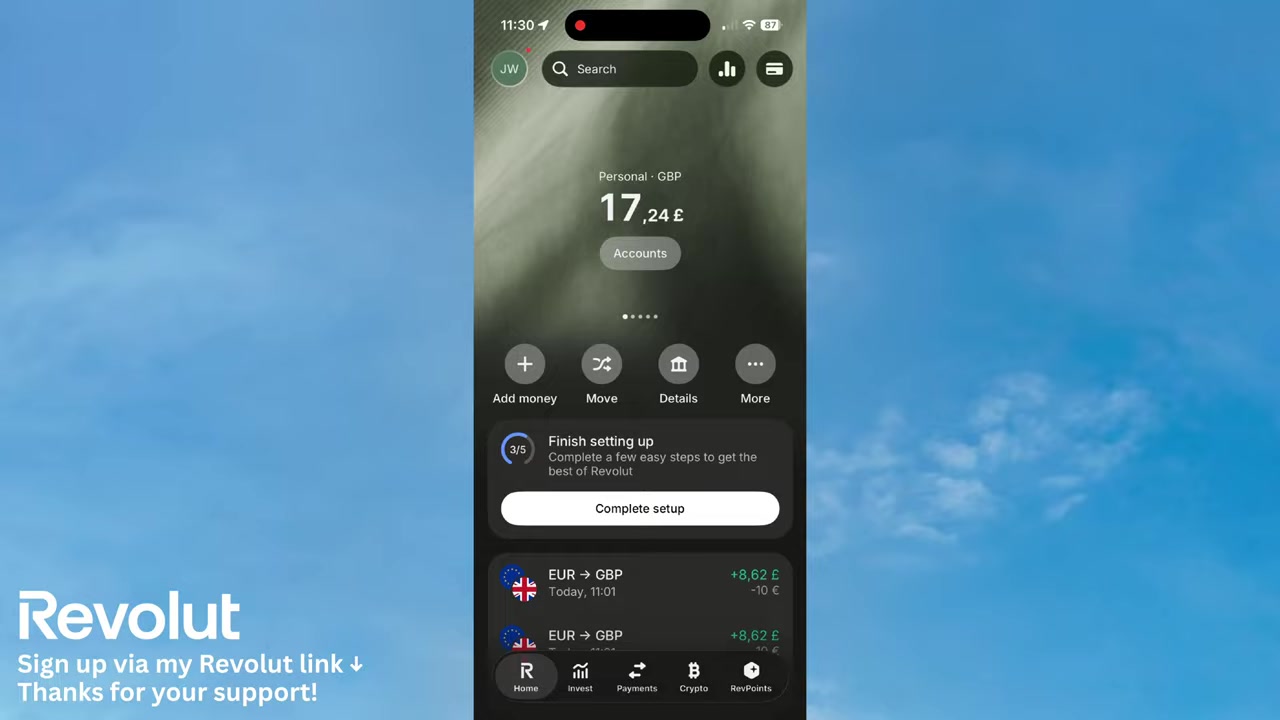
3. Find the QR Code Icon in Revolut
On the recipient entry screen, you'll see fields for bank details and a Revolut tag. Look to the right side of the input field — there's a small QR code icon.
Tap that icon and your camera will open immediately, ready to scan.
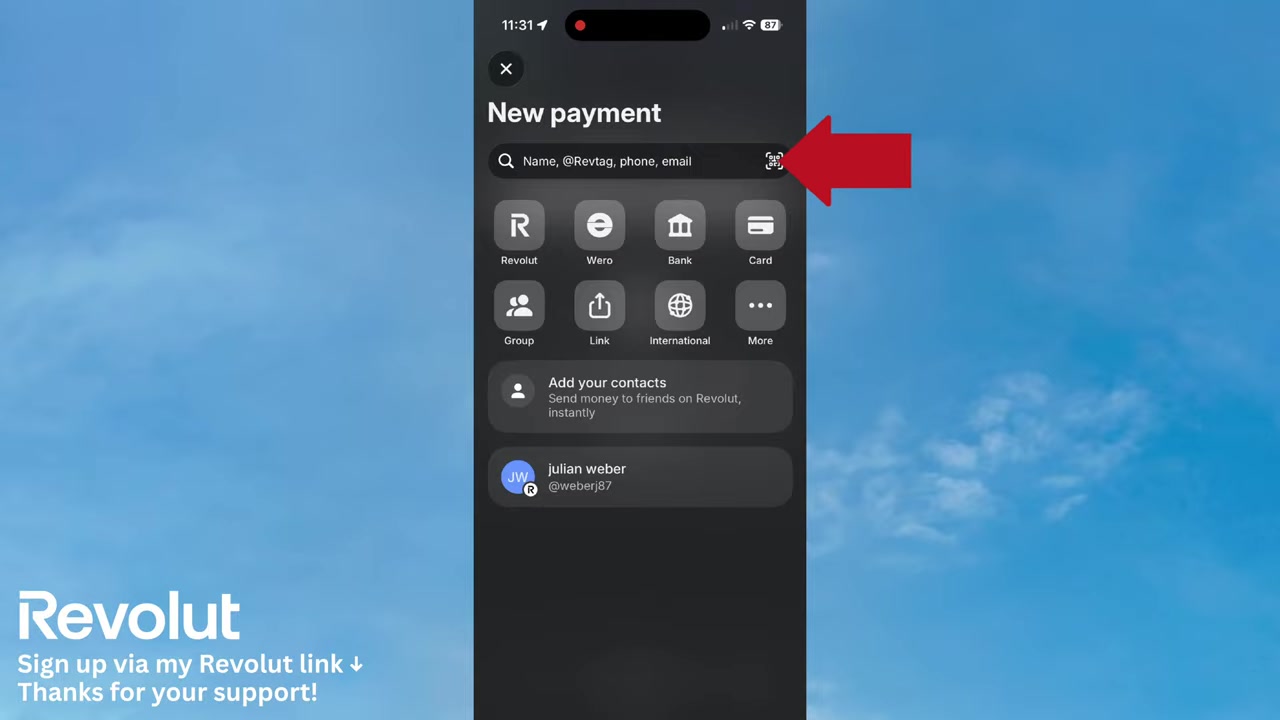
4. Scan a QR Code to Pay Someone on Revolut
Once the camera is open, you'll see two options: Pay and Receive money. To pay someone, select Pay and point your camera at the QR code.
Revolut will scan it instantly and take you to the payment confirmation screen. All the recipient details and the amount are pre-filled automatically — no manual entry required.
Just tap Add recipient, confirm the amount on the next screen, then hit Continue to complete the transfer. That's it!
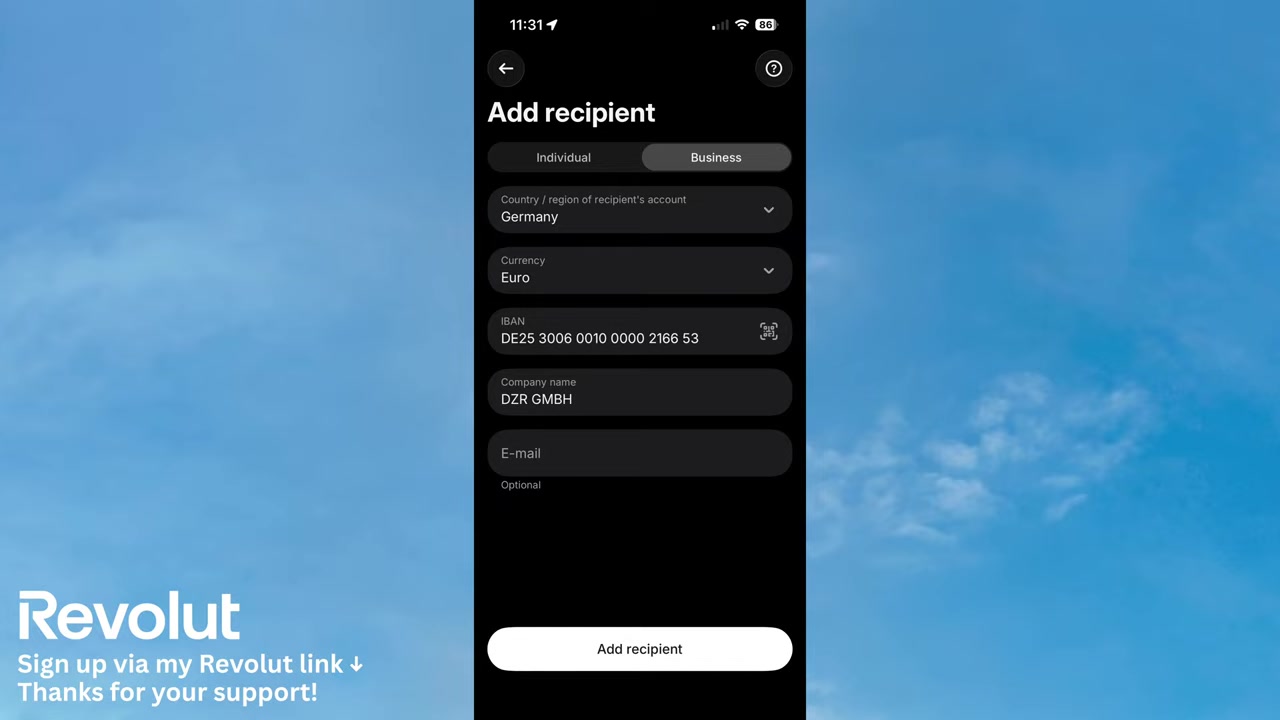
5. Show Your Own QR Code to Receive Money
You can also use the same scanner screen to receive payments. Tap Receive money and Revolut will display your personal QR code on screen.
Share it with whoever needs to pay you — they scan it, and the payment lands directly in your Revolut account. No account numbers, no sorting codes, no fuss.
This is a great feature if you run a small business or regularly split costs with friends. For business-specific features, check out Revolut for Business.
6. Is Revolut Safe for QR Code Payments?
Yes — QR payments on Revolut go through the same secure infrastructure as all other transactions on the platform. The app verifies payment details before you confirm, so you always see exactly who you're paying and how much.
That said, always double-check the recipient details on the confirmation screen before tapping Continue. Only scan QR codes from trusted sources to avoid misdirected payments.
7. Revolut vs Other Payment Apps for QR Codes
Many mobile payment apps offer QR scanning, but Revolut stands out because it combines QR payments with multi-currency accounts, international transfers, and budgeting tools — all in one app.
For personal or business use across borders, Revolut's QR feature is particularly useful because it works with the same account you already use for everything else. No need for a separate payment app.
If you're curious about other things you can do with Revolut, check out our guides on sending money internationally and transferring money to your bank account.
Frequently Asked Questions
Where is the QR code scanner in the Revolut app?
Can I receive money using a QR code on Revolut?
Does Revolut auto-fill payment details from a QR code?
Is QR code payment on Revolut free?
Can I use Revolut QR codes for business payments?
What type of QR codes can Revolut scan?
Why isn't my Revolut QR scanner working?
8. Disclosure
Some links in this post are affiliate links. A commission may be earned if you sign up or make a purchase through these links — at no extra cost to you. All content is provided for informational purposes only without any guarantee of accuracy or results. Nothing in this post constitutes financial, legal, tax, or investment advice.
Related Articles

22 Jun 2026
How To Send Money Internationally With Revolut In 2 Minutes!
Sending money abroad can feel complicated — but with Revolut, it takes just a couple of minutes. In this quick tutorial, you'll learn exactly how to make an international transfer with Revolut, step b...
19 Jun 2026
How to Transfer Money to Bank Account from Revolut (New Tutorial 2026)
Want to send money from Revolut to a bank account but not sure where to start? It's actually much simpler than you might think. In this step-by-step tutorial, you'll learn exactly how to do it in just...

20 Jun 2026
How to Invest on Revolut (2026)
Wondering how to invest your money directly inside Revolut? It's easier than you might think. This guide walks you through the entire process — from opening the Invest tab to placing your first stock ...