How To A/B Test Your YouTube Thumbnails To Get More Views
Your YouTube thumbnail is one of the most powerful factors determining whether someone clicks on your video — or scrolls past it. In this guide, you'll learn how to A/B test your YouTube thumbnails using TubeBuddy so you can let real data decide which design wins, instead of relying on gut feeling.
1. Why Click-Through Rate Is Everything on YouTube
According to YouTube insiders — including engineers who have spoken publicly on the topic — two metrics matter most for video growth: click-through rate (CTR) and average watch time.
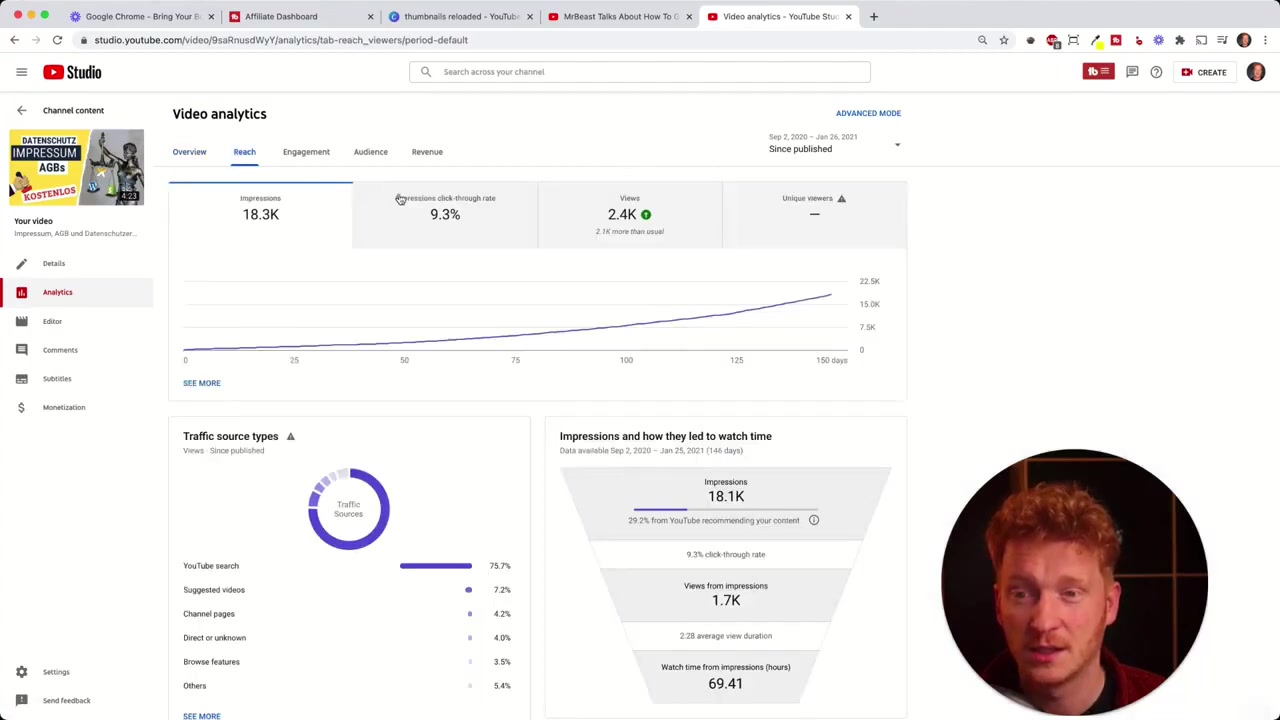
You can find your CTR inside YouTube Analytics under the Reach tab. Click on "Click-Through Rate" and you'll see what percentage of people who saw your thumbnail actually clicked on it.
Even a small improvement in CTR can have a massive compounding effect on your total views. That's exactly why testing your thumbnails systematically is so valuable.
2. What Is TubeBuddy and How Does It Help?
TubeBuddy is a browser extension for Chrome, Safari, Opera, and other browsers that plugs directly into your YouTube channel. It's recommended by many well-known YouTubers and offers tools for keyword research, publishing, and — most importantly for this guide — A/B thumbnail testing.
Once installed, TubeBuddy connects to your channel via the Chrome extension and gives you access to a dedicated A/B test section right inside your dashboard.
3. Set Up Your First YouTube Thumbnail A/B Test
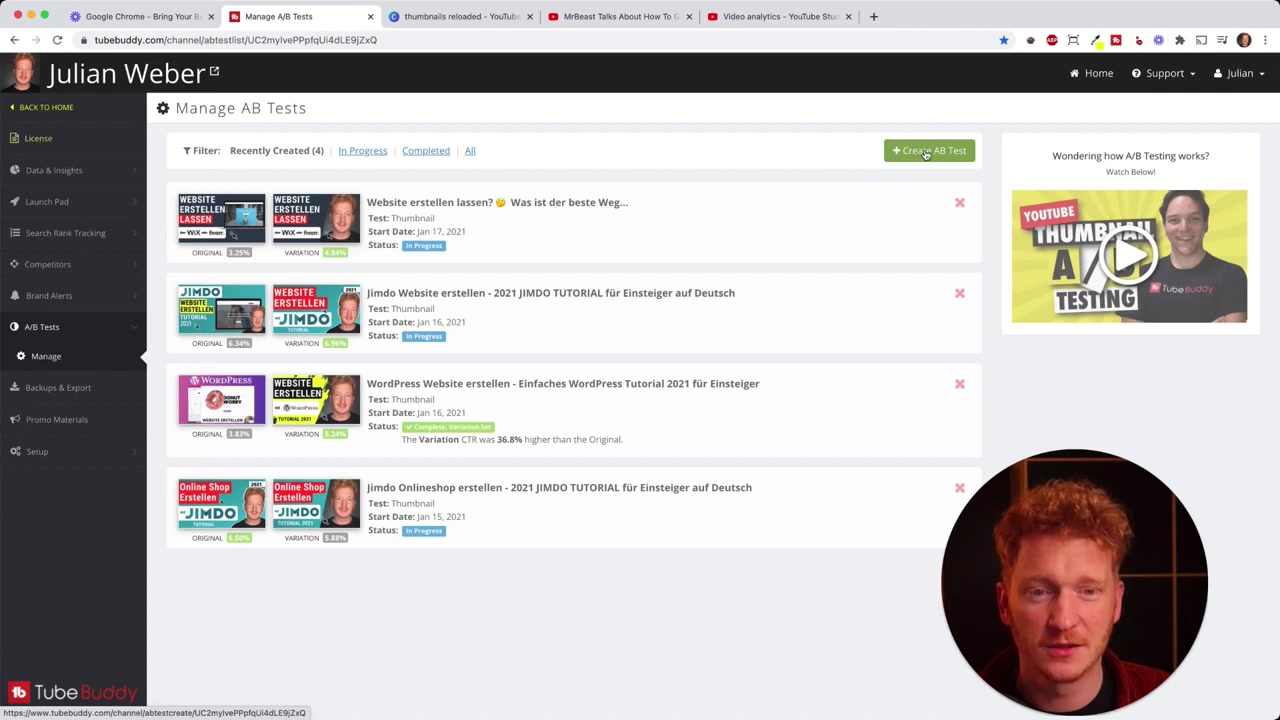
Getting started is straightforward. After installing the TubeBuddy extension and logging in, navigate to the A/B Test section in the dashboard. You'll need to be on the top-tier plan to access this feature — it's a paid upgrade, but the impact on your channel growth makes it worthwhile.
Click Create A/B Test and then select the video you want to test. You can either pick from your recently uploaded videos or search by name — TubeBuddy will pull it directly from your channel.
4. Choose the Right Test Duration
This step is critical: set the test to run for at least 14 days. You need enough data to draw a reliable conclusion.
If your channel already has a large audience, you may get enough data in 7 days. But for channels in the 100–1,000 subscriber range, 14 days is the safe minimum.
You can also schedule a start date so the test begins at the start of a full 24-hour cycle, giving you cleaner daily data to work with.
5. Upload Your Second Thumbnail and Launch the Test
After setting the duration, simply upload your second thumbnail variant and hit start. TubeBuddy will automatically alternate between the two versions and track the results.
Pro tip: Make drastic design changes between variants, not subtle ones. For example, test a thumbnail with your face versus one without. Testing tiny tweaks like repositioning a single element won't give you meaningful results.
6. Reading Your A/B Test Results
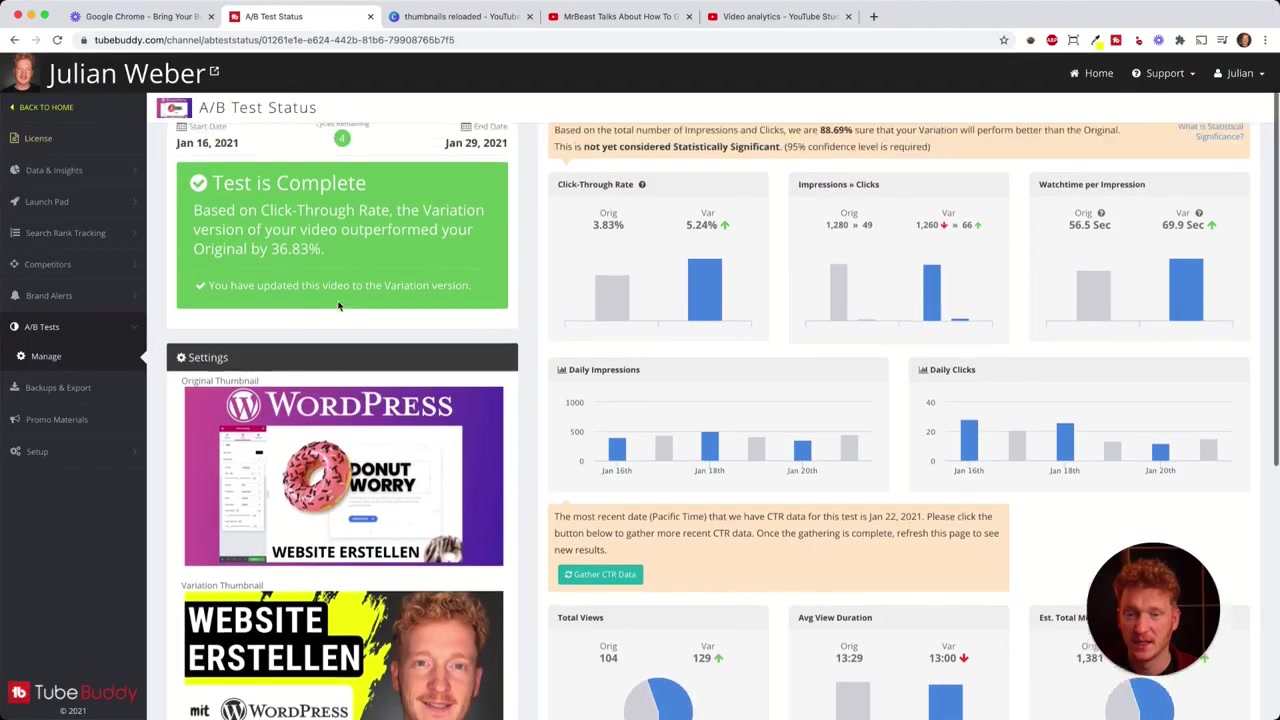
Once the test completes, TubeBuddy shows you a detailed breakdown. In one example test — a WordPress tutorial — the thumbnail featuring a face achieved a 5.24% CTR compared to 3.8% for the version without, a difference of 36.8%.
Beyond CTR, you also get data on:
- Impressions for each variant
- Watch time per impression
- Daily impressions and clicks over time
- Clicks by traffic source (YouTube Search, Suggested Videos, Browse Features)
Breaking down performance by traffic source is especially useful. For example, if you create search-focused content, you'll want to prioritize the variant that wins on YouTube Search — because that tells you people liked what they saw when actively looking for your topic.
7. Real Results: What YouTube Thumbnail Testing Did for This Channel
After consistently running A/B tests with TubeBuddy, channel views grew by roughly 20% within a single month. That's a meaningful lift, and it came purely from optimizing thumbnails — without changing the content itself.
When the data is this clear, spending money on a tool that drives real results is an easy decision. You stop guessing and start growing.
8. How to Design Better Thumbnails to Test
If you're not sure where to start with thumbnail design, tools like Canva make it easy to create professional-looking thumbnails in minutes — no design skills required.
When creating variants to test, consider experimenting with:
- Your face vs. no face
- Different background colors (e.g., yellow vs. dark)
- Font styles and sizes
- Text overlay vs. no text
The more distinct the two options, the more useful your test results will be.
9. TubeBuddy Pros and Cons
Pros:
- Easy to set up — takes just a few minutes
- Detailed stats broken down by traffic source
- Works directly inside your YouTube dashboard
- Covers keyword research and other channel tools too
Cons:
- A/B testing is only available on the most expensive plan
- You need at least moderate traffic to get statistically significant results quickly
- Requires the Chrome extension to be installed
10. Is TubeBuddy Worth It for Small YouTube Channels?
If you're serious about growing on YouTube, the answer is yes — even for smaller channels. CTR is one of the most impactful levers you can pull, and guessing which thumbnail is better wastes time and opportunity.
The A/B testing feature alone can justify the cost if it helps even one or two of your videos rank significantly better. You're not just buying a tool — you're buying data that shapes every future thumbnail you make.
Frequently Asked Questions
What is YouTube thumbnail A/B testing?
How long should a YouTube thumbnail A/B test run?
Does TubeBuddy work on channels outside the US?
What metrics does TubeBuddy track in an A/B thumbnail test?
Can I test more than two thumbnails at once?
What kind of thumbnail changes should I test first?
Will A/B testing thumbnails affect my video's ranking?
Do I need a paid TubeBuddy plan to run thumbnail tests?
11. Disclosure
Some links in this post are affiliate links. If you make a purchase through them, a small commission may be earned at no extra cost to you. All content is provided for informational purposes only, and no guarantee of results is given. Nothing in this post constitutes financial, legal, tax, or investment advice.
Related Articles

28 Oct 2025
How to Create a TikTok Ads Account in 2026
Want to run ads on TikTok but not sure where to start? Setting up your TikTok Ads Manager account is easier than you think — and it only takes a few minutes. In this guide, I'll walk you through the e...

15 Dec 2025
Wix Promo Code 2026 – How to Save on Wix Premium Plans
If you've been thinking about upgrading to a Wix premium plan, timing your sign-up the right way can make a real difference. In this guide, I'll walk you through the exact method to access the best av...
7 Nov 2025
TikTok Ads Tutorial – Snelstartgids voor Beginners
Wil je nieuwe klanten bereiken via TikTok? In deze tutorial laat ik je stap voor stap zien hoe je je eerste TikTok advertentiecampagne opzet – ook als je nog nooit eerder hebt geadverteerd. We beginne...