Webador Review (2026) – Pros, Cons, and Features Explained
Looking for an honest Webador review? You're in the right place. In this post, we'll walk through everything Webador has to offer — from its pricing plans and design templates to its e-commerce tools and customization limits — so you can decide whether it's the right website builder for you.
Webador is marketed as a beginner-friendly platform, and it genuinely lives up to that promise. But it has trade-offs worth knowing before you commit. Let's dig in.
You can try Webador for free and explore the platform yourself with no risk.
1. What is Webador?
Webador is a website builder designed with simplicity in mind. It lets you create personal websites, business sites, and online stores without any coding knowledge.
The interface is section-based — you stack content blocks on top of each other to build your pages. Think of it as a clean, no-fuss alternative to more complex platforms like Wix, Squarespace, or Shopify.
It's particularly well-suited for first-time website owners who want to get online quickly without a steep learning curve.

2. Webador Pricing Plans Explained
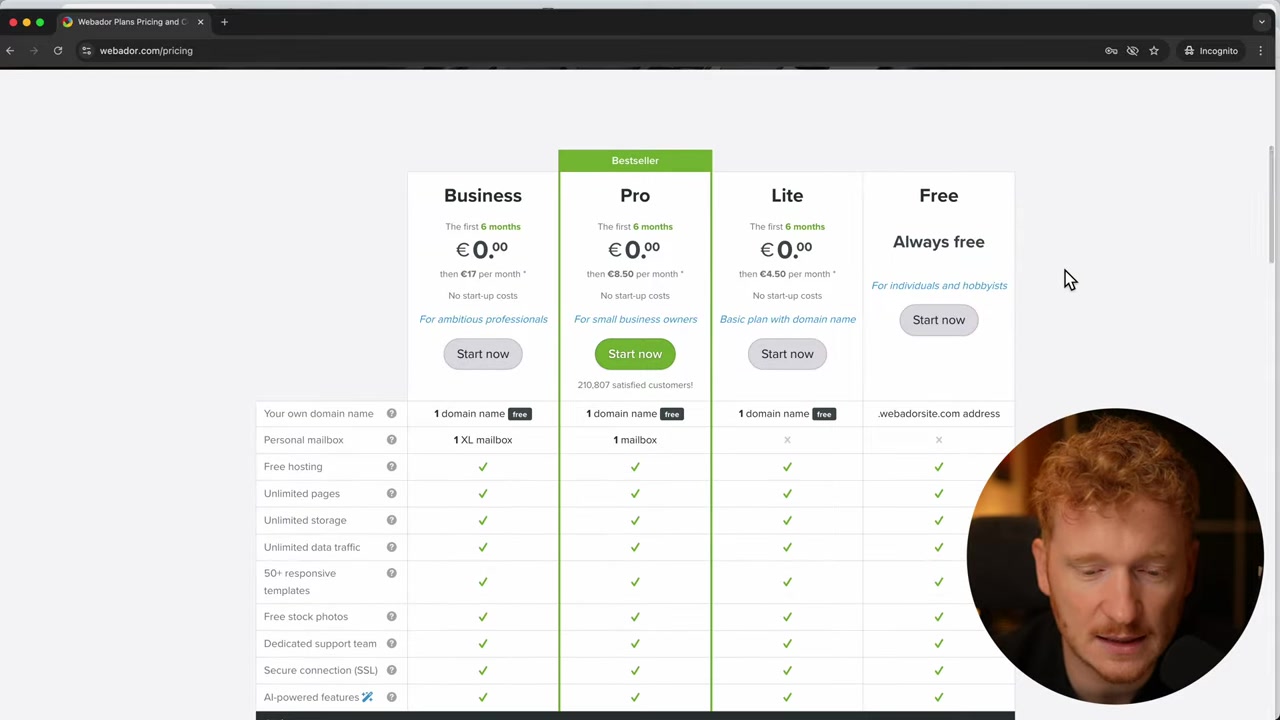
Pricing is arguably Webador's biggest selling point. Here's a quick breakdown of the three available plans:
- Free — Get started at no cost, with limited features.
- **Light (~4.50/month)** — Includes a free custom domain. This is remarkable value for a website under your own domain for less than 5 a month.
- Pro (~8–10/month) — Adds a free domain and a professional mailbox, so you can ditch the Gmail address for business communication.
- Business — Unlocks unlimited online store products, digital product sales, and a larger 10 GB mailbox.
Webador also runs a deal where you get the first six months free, regardless of the plan you choose. You only pay for the second half of the year.
The main differences between Pro and Business come down to two things: mailbox size and e-commerce capacity. Pro lets you list up to 10 products; Business gives you unlimited listings and the ability to sell digital products and services.
3. Ease of Use – Is Webador Good for Beginners?
Short answer: yes. Webador is one of the easiest website builders to get started with.
Everything is organized in stacked sections. You pick a section type — About, Services, Pricing, Team, Testimonials, Contact — and drop it onto your page. There's no blank canvas to stare at.
Setting up a basic page takes about two minutes. After that, you just replace the placeholder content with your own text, images, and branding. It's straightforward enough that you don't need a tutorial to figure it out.
4. Design Options and Templates in Webador
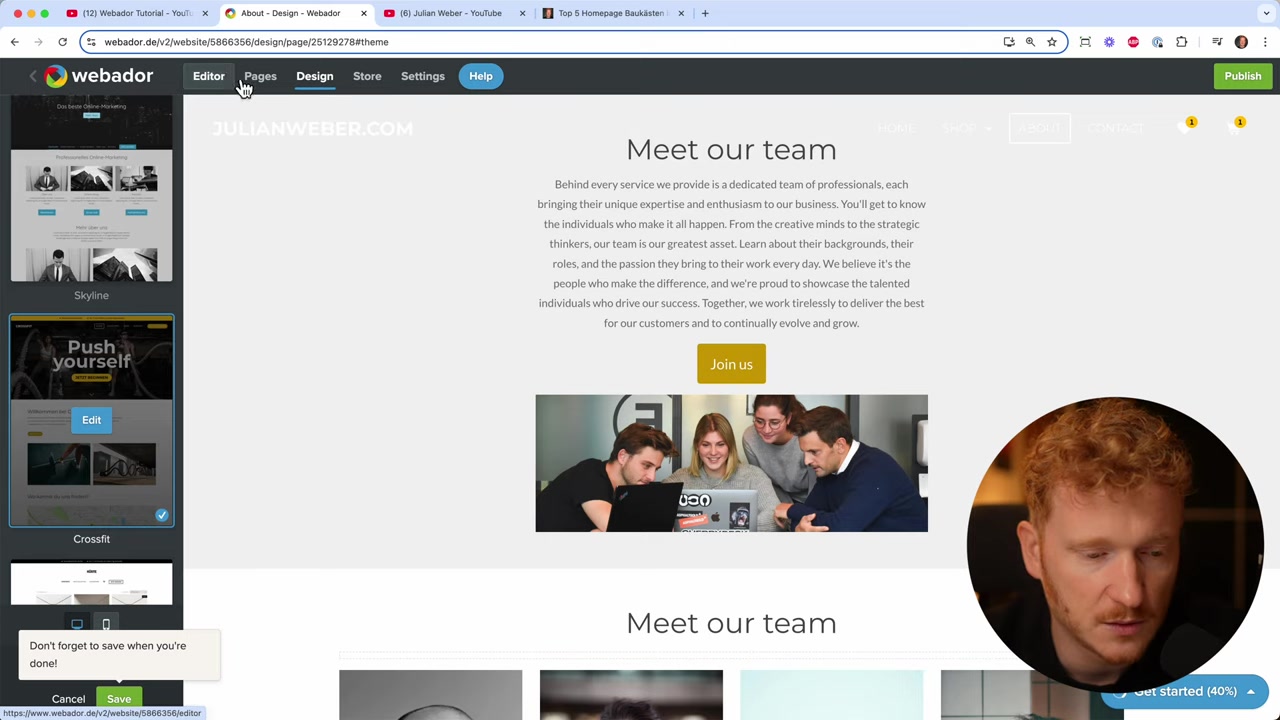
Webador gives you a solid selection of design templates. You can switch between them with a single click, and your entire website instantly gets a fresh look — new layout, new colors, new typography.
You can also manually adjust accent colors to better match your brand. The ability to preview and switch themes on the fly is a genuinely nice touch.
That said, customization has limits. Unlike Wix or Squarespace — which use true drag-and-drop editors — Webador restricts where elements can be placed. You can align a button left, center, or right, but you can't drag it freely around the canvas.
For beginners, this is actually helpful. Fewer options mean less overwhelm. But if you want pixel-perfect control over your layout, Webador will feel restrictive.
5. App Integrations and Connected Platforms
Webador has an app market that lets you connect your site to popular third-party platforms. Supported integrations include:
- Instagram and Facebook for social feeds
- Spotify for embedded music
- Google Drive for file sharing
- Airbnb and Calendly for booking and availability
- YouTube for video embeds
- GoFundMe for donation campaigns
This is a surprisingly broad list for a builder at this price point. Being able to plug in social proof, booking tools, and donation widgets without custom code adds real value for small business owners and creators.
6. E-Commerce Features – Selling Online with Webador
Webador supports a basic but functional online store. Here's what you get:
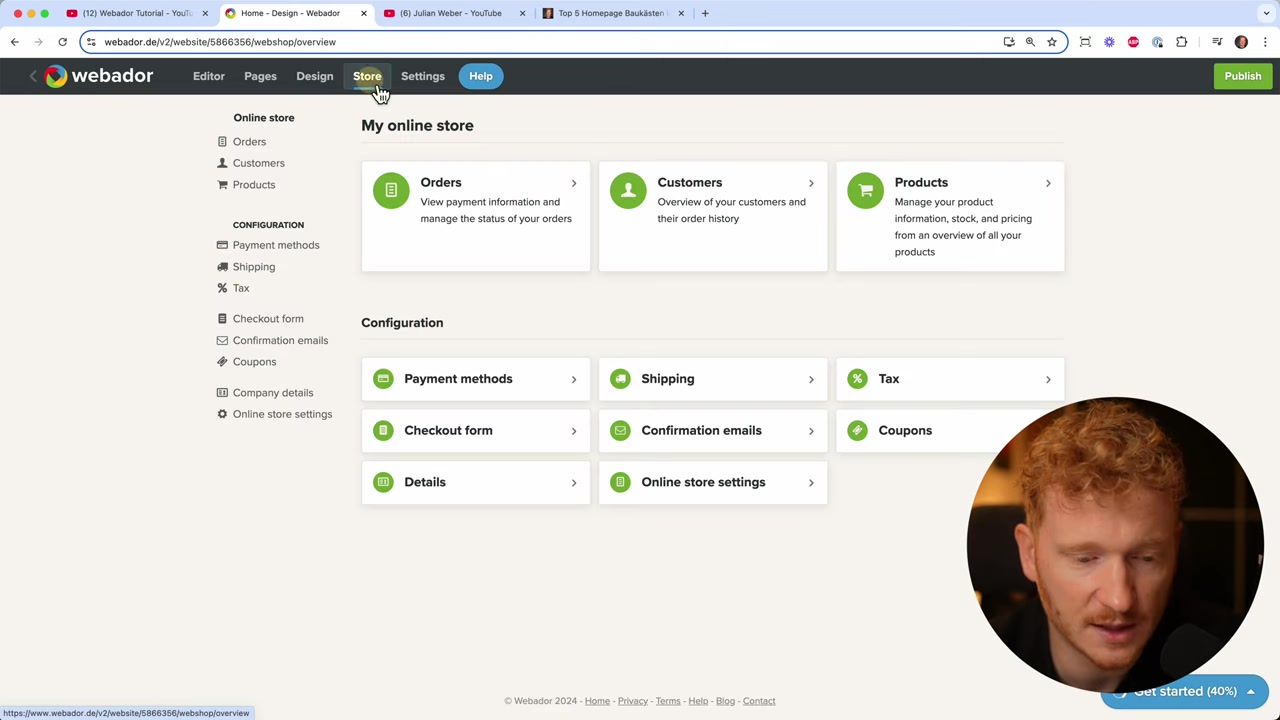
- Connect Stripe and PayPal as payment methods
- Upload product listings with images and descriptions
- Manage shipping information and print shipping labels directly from the dashboard
- View orders and customer data inside Webador
The Pro plan supports up to 10 products. If you need more — or want to sell digital products and services — you'll need to upgrade to the Business plan.
It's not Shopify-level functionality, but for a small shop just getting started, it covers the essentials. If you're curious about setting up a store step by step, check out the Webador e-commerce tutorial for a full walkthrough.
7. Webador Pros and Cons
Here's a quick summary to help you weigh your options:
Pros:
- Very affordable pricing, especially the Light plan
- Beginner-friendly section-based editor
- Free trial available with no credit card required
- One-click design theme switching
- Over 2 million free stock photos included
- Good range of app integrations
- Built-in e-commerce with shipping label printing
- Professional email mailbox on paid plans
Cons:
- Limited layout customization — no free drag-and-drop
- Not suitable for complex or highly custom website designs
- Pro plan caps product listings at 10
- Digital product sales only available on Business plan
- Fewer advanced features compared to Wix or Squarespace
8. Webador vs Wix – Which Should You Choose?
If you want maximum flexibility, Wix is the stronger platform. It's a true drag-and-drop builder — you can place every element anywhere on the page. It also supports online courses, advanced e-commerce, and a much larger app marketplace.
Webador, on the other hand, wins on simplicity and price. If you're building your very first website and just want something live quickly, Webador removes a lot of the friction that Wix can introduce for complete beginners.
A good rule of thumb: start with Webador if you want fast and affordable. Upgrade to Wix when you need more power and flexibility.
9. How Much Does Webador Cost?
Webador offers one of the most competitive pricing structures among website builders:
| Plan | Price | Key Feature |
|---|---|---|
| Free | $0 | Basic site, Webador subdomain |
| Light | ~$4.50/mo | Custom domain included |
| Pro | ~$8–10/mo | Domain + professional email |
| Business | Higher | Unlimited store + digital products |
All paid plans currently include a deal where the first six months come at no charge. Check the Webador pricing page for the exact rates in your region, as prices vary slightly by country.
10. Disclosure
Some links in this post are affiliate links. If you click through and make a purchase, I may earn a small commission at no extra cost to you. All content is provided for informational purposes only — no guarantees are made regarding outcomes. This post does not constitute financial, legal, tax, or investment advice.
Frequently Asked Questions
Is Webador free to use?
Can I sell products on Webador?
Does Webador include a free domain?
Is Webador suitable for complete beginners?
What payment methods does Webador support for online stores?
Can I use my own email address with Webador?
How many stock photos does Webador offer?
What third-party apps can I connect to Webador?
Related Articles
26 Feb 2025
Webador Review - Voordelen, nadelen en functies uitgelegd
Ben je op zoek naar een eenvoudige en betaalbare websitebouwer? Dan heb je vast al eens van Webador gehoord. In deze review nemen we Webador grondig onder de loep: de prijsplannen, het gebruiksgemak, ...

5 Mar 2025
Maak een webwinkel met Webador – Stap-voor-stap Tutorial
Wil je een eigen webwinkel starten zonder technische kennis? Met Webador maak je in no time een professionele online shop. In deze tutorial laat ik je stap voor stap zien hoe je de winkel inschakelt, ...

27 Feb 2025
Webador Anmeldelse – Fordele, Ulemper og Funktioner Forklaret
Er du på udkig efter en enkel og overkommelig hjemmesidebygger? Webador er et populært valg – særligt for begyndere. I denne anmeldelse gennemgår vi fordele, ulemper, priser og nøglefunktioner, så du ...