Squarespace Discount Code – Where to Apply a Squarespace Promo Code
Before you pay for Squarespace, it is worth checking for a promo code. In this post I show where you enter a Squarespace discount code, which codes worked in my video, and what to check before you buy.
Start by signing up for Squarespace through my partner link, where I always link the best deal I can find.
1. Start Your Squarespace Free Trial
Click the Squarespace link and sign up with your email and a password. You get a 14-day trial to build your website.
When the trial ends, you need to upgrade to keep editing your site. That is the moment to use a promo code.
2. Choose a Squarespace Plan
Click Upgrade and you see four plans: Basic, Core, Plus and Advanced. You pick monthly or yearly billing for each.
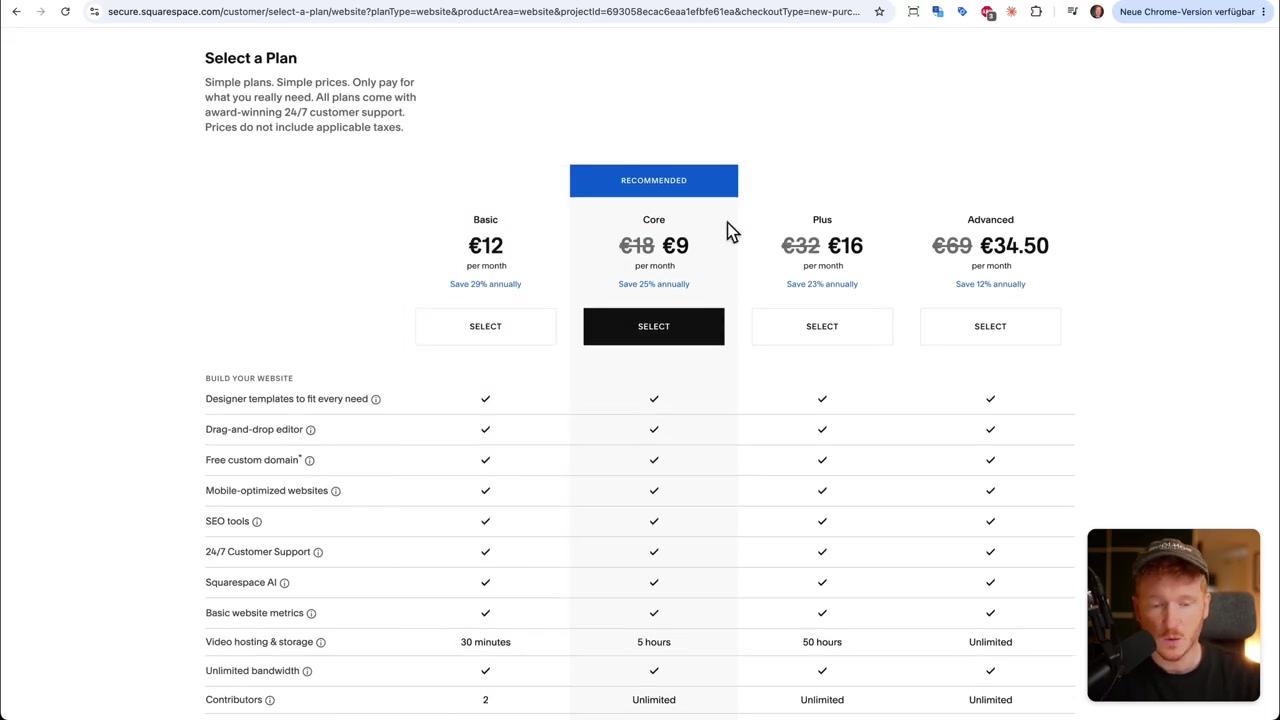
Look closely at the prices. When I recorded the video, some plans already showed a reduced price on this page, without any code. Compare that price with what a code would give you.
3. Apply a Squarespace Discount Code at Checkout
Choose your plan, pick monthly or yearly and confirm. On the checkout page, the Order Summary on the right has a Promo Code field.
I tried two codes in the video. The first one only worked until the end of September. The second one, SQUARESPACE20, was valid for longer and lowered the price of the Basic plan.
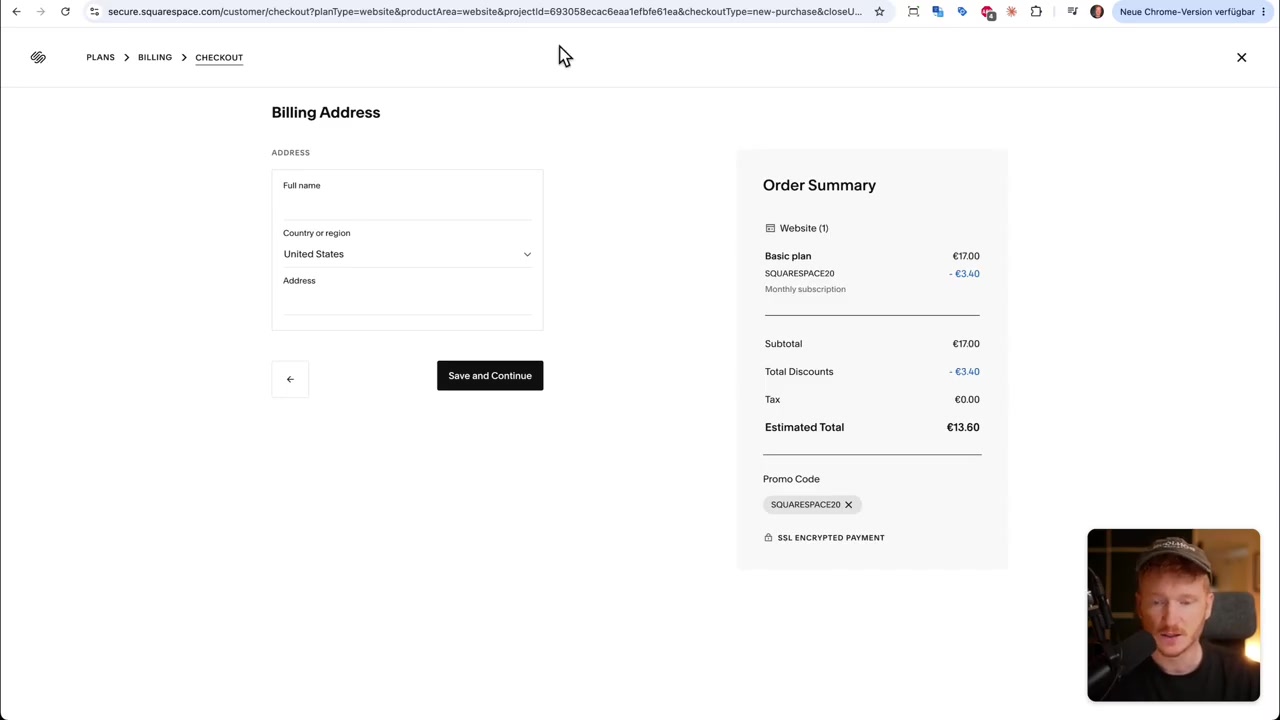
Enter the code, click Apply and check the Estimated Total before you pay. Codes change often, so I keep the current ones in the description of the video.
4. What Is Squarespace?
Squarespace is a website builder with designer templates and a drag-and-drop editor. Hosting, SSL and support are included, so you do not need a separate hosting provider.
It is popular with creatives, small businesses and online shops that want a polished look without much setup.
5. How Much Does Squarespace Cost?
When I recorded the video, the plans started at €12 per month for Basic, with yearly billing cheaper than monthly. Prices vary by country and change over time, so check the plan page for your region.
All plans include templates, the editor, SEO tools, mobile-optimized websites and 24/7 support. The bigger plans add more video storage, more contributors and commerce features.
6. Squarespace vs Wix
Both are all-in-one website builders. Squarespace is known for its clean templates. Wix gives you more freedom in the editor and a large app market.
If you are still deciding, my Wix pricing post shows what Wix costs, and there is a Wix promo code post as well.
Frequently Asked Questions
Where do I enter a Squarespace promo code?
Does Squarespace have a free trial?
Why doesn't my Squarespace discount code work?
Can I combine a promo code with Squarespace's own sale prices?
Which Squarespace plan should I choose?
Can I upgrade my Squarespace plan later?
Disclosure
Some links in this post are affiliate links. If you buy through them, I may earn a commission at no extra cost to you. All content is for information only and comes with no guarantee. It is not financial, legal, tax or investment advice.
Related Articles

15 Dec 2025
Wix Promo Code 2026 – How to Save on Wix Premium Plans
If you've been thinking about upgrading to a Wix premium plan, timing your sign-up the right way can make a real difference. In this guide, I'll walk you through the exact method to access the best av...
10 Nov 2025
Hostinger Coupon Code For Black Friday – Save Up to 85% with this Promo Code 💸
Looking for the best Hostinger coupon code? You're in the right place. In this guide, I'll walk you through exactly how to claim the biggest savings on Hostinger's Black Friday deal — including how to...

22 Aug 2024
How Much Does Wix Cost? – Wix Pricing Plans Explained
Thinking about building a website with Wix but not sure what it's actually going to cost you? You're not alone — Wix pricing can feel a little confusing at first glance. In this guide, we walk through...