How to Transfer Crypto to Wallet from Revolut (2026 New Tutorial)
Want to move your crypto out of Revolut and into your own wallet? It's simpler than you might think. In this tutorial, we'll walk you through exactly how to send cryptocurrencies from your Revolut account to any external wallet — step by step.
1. What is Revolut Crypto?
Revolut is a popular digital banking app that lets you buy, hold, and send cryptocurrencies directly from your phone. It supports a range of major coins and allows you to transfer them to external wallets.
This makes Revolut a convenient on-ramp for crypto — you can buy crypto easily and then move it to a self-custody wallet or another exchange like Coinbase or Binance whenever you're ready.
2. Open the Crypto Tab in Revolut
Start by opening your Revolut app. You'll land on the Home tab by default.
From there, tap on the Crypto tab. This is where you'll see your full crypto account balance and all the coins you currently hold.
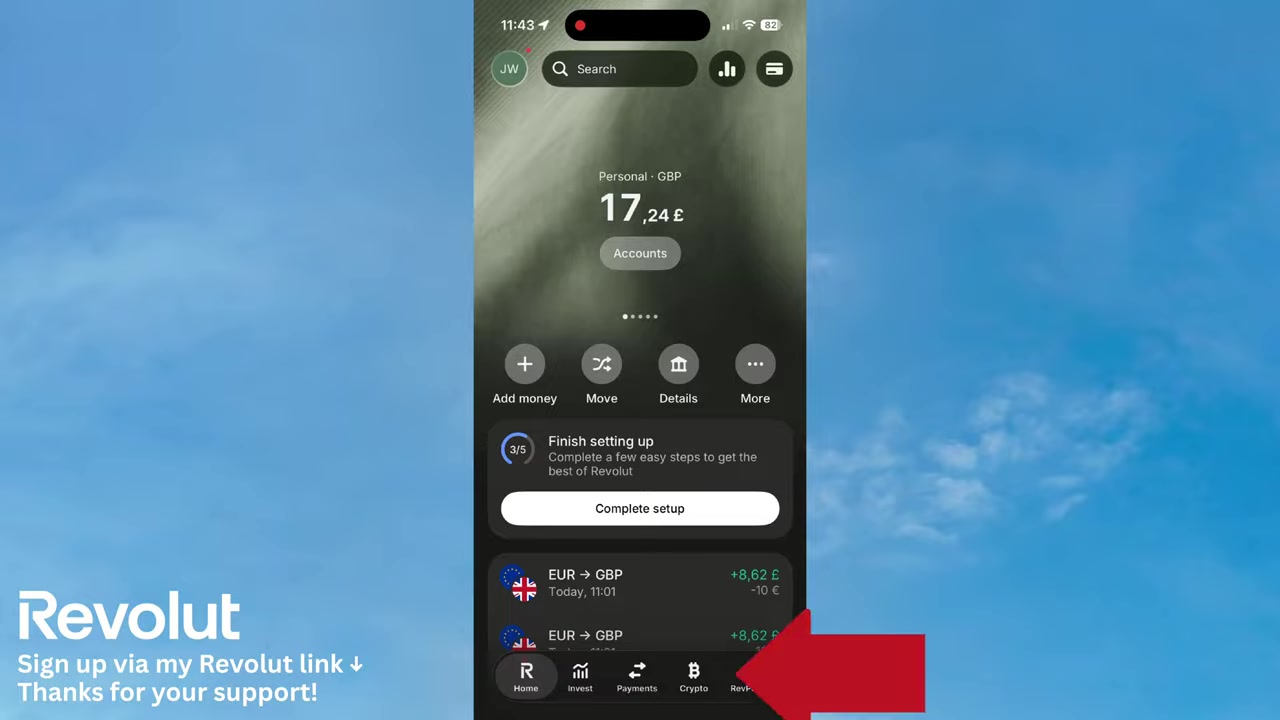
3. Tap Send to Start Your Revolut Crypto Transfer
Inside the Crypto tab, tap the Send button. Revolut gives you two options at this point:
- Scan a QR code — useful when sending directly to a friend who's nearby
- Add a wallet address — for sending to any external wallet or exchange
For most use cases — including sending to your own hardware wallet, Coinbase, or Binance — you'll want to choose Add a wallet address.
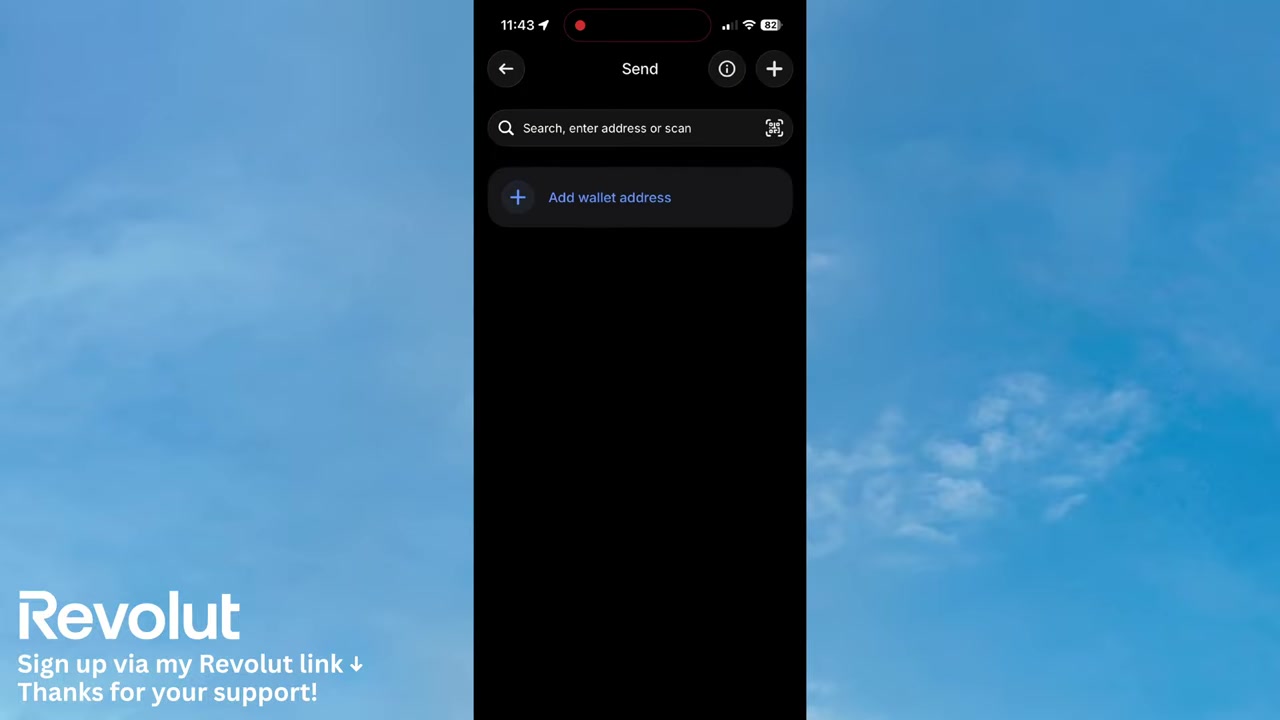
4. Add Your External Wallet Address
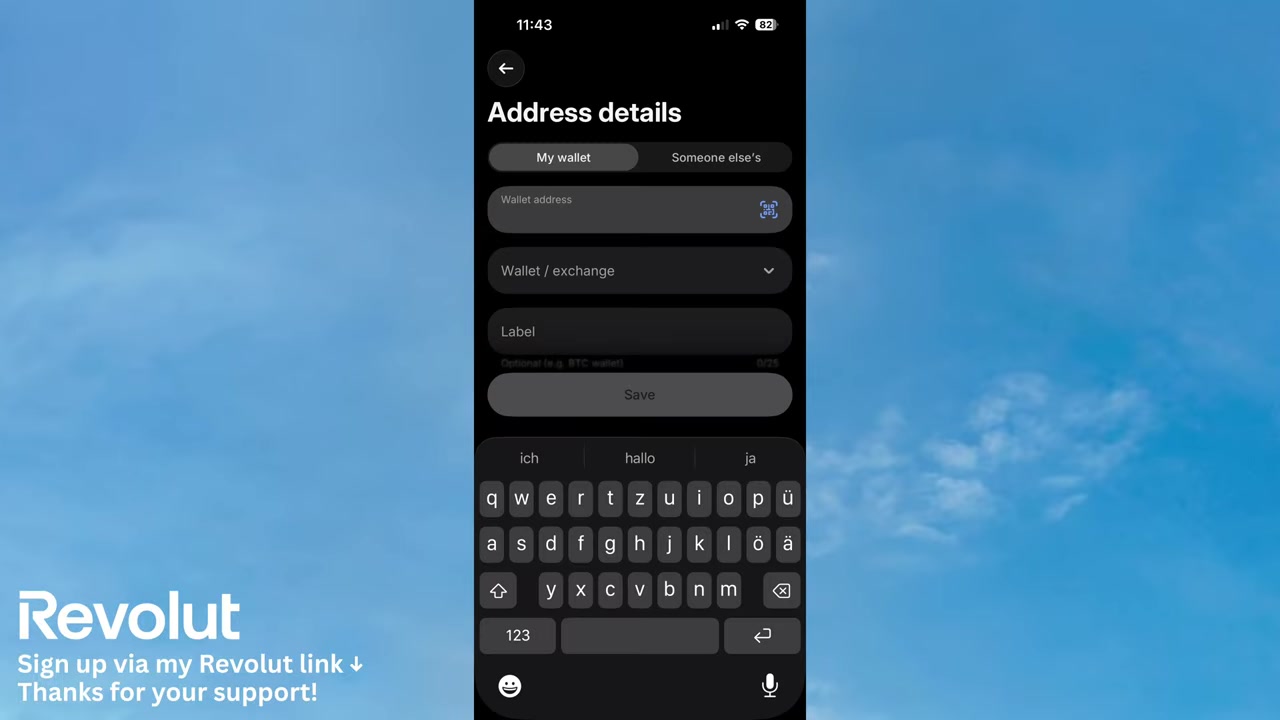
On the next screen, you can add either your own wallet or someone else's. Here's what to fill in:
- Wallet address — paste the exact address of the destination wallet
- Wallet exchange — select the exchange or wallet provider (e.g. Coinbase, Binance, crypto.com)
- Label — this is optional, but it helps you identify the wallet later
Double-check the wallet address before proceeding. Crypto transactions are irreversible — sending to the wrong address means your funds cannot be recovered.
5. Enter Recipient Info and Save the Wallet
Revolut also asks for recipient information at the bottom of the form. You'll need to indicate whether the recipient is an individual or a business, and then enter their first name, middle name (if applicable), and last name.
Once everything looks correct, tap Save. The wallet is now stored in your Revolut account and you can initiate the transfer.
6. Important Things to Know Before Sending Crypto with Revolut
Before you hit send, keep these things in mind:
- Network compatibility — make sure the blockchain network matches between Revolut and your destination wallet. Sending on the wrong network can result in lost funds.
- Transfer fees — Revolut may charge a small fee for crypto withdrawals. Check the fee breakdown before confirming.
- Supported cryptocurrencies — not all coins supported by Revolut can be withdrawn to external wallets. Verify this in the app first.
- Processing time — transfers are not always instant. Depending on network congestion, it can take a few minutes to several hours.
7. Does Revolut Support External Wallet Transfers?
Yes — Revolut does support sending crypto to external wallets. This feature is available to standard Revolut users, though there may be limits depending on your plan.
If you're running a business and need crypto transfers at scale, Revolut for Business is worth exploring. It offers additional features tailored to business needs.
8. Revolut Crypto Transfer Fees Explained
Revolut charges a crypto withdrawal fee when you send crypto to an external wallet. The exact fee depends on the cryptocurrency and the network used.
Always review the fee summary screen inside the app before confirming any transfer. This ensures there are no surprises and that the amount received at the destination is what you expect.
Frequently Asked Questions
Can I send crypto from Revolut to an external wallet?
How do I find my wallet address to receive crypto from Revolut?
Does Revolut charge a fee for crypto withdrawals?
How long does a Revolut crypto transfer take?
What information do I need to send crypto from Revolut?
Can I send any cryptocurrency from Revolut to an external wallet?
Is it safe to transfer crypto from Revolut?
Can I save a wallet address in Revolut for future transfers?
9. Disclosure
Some links in this post are affiliate links. A commission may be earned if you sign up through these links — at no extra cost to you. All content is provided for informational purposes only, without guarantee of accuracy or results. Crypto investments and transfers involve risk and may not be regulated in all jurisdictions — your capital may be at risk. This post does not constitute financial, legal, tax, or investment advice. Always do your own research and consult a qualified professional if needed.
Related Articles

22 Jun 2026
How To Send Money Internationally With Revolut In 2 Minutes!
Sending money abroad can feel complicated — but with Revolut, it takes just a couple of minutes. In this quick tutorial, you'll learn exactly how to make an international transfer with Revolut, step b...

28 Oct 2025
How to Create a TikTok Ads Account in 2026
Want to run ads on TikTok but not sure where to start? Setting up your TikTok Ads Manager account is easier than you think — and it only takes a few minutes. In this guide, I'll walk you through the e...

4 Sep 2025
TikTok Creative Center Tutorial (2026) – How to Find Top Ads on TikTok
Want to know which TikTok ads are crushing it right now — and how to model them for your own campaigns? In this tutorial, you'll learn two proven strategies to find winning ad creatives on TikTok, inc...