ElevenLabs Tutorial 2026 – Best AI for Voice Cloning Explained
In this tutorial from the Julian Weber channel, you'll learn everything you need to know about ElevenLabs — the leading AI for voice generation, voice cloning, and video dubbing. Whether you want to create realistic voiceovers, clone your own voice, or translate your videos into a dozen languages, ElevenLabs has a feature for it. Let's walk through the whole thing step by step.
1. What is ElevenLabs?
ElevenLabs is an AI platform focused entirely on audio. It has been around since nearly the beginning of the AI boom, and its core strength has always been voice technology.
Over time it has grown into a full audio suite. Today you can generate voices, clone your own voice, create audiobooks, produce podcast conversations, remove background noise, and even dub videos into other languages — all inside one platform.
If you ever need to do anything audio-related with AI, ElevenLabs is the first tool you should reach for.
2. How to Sign Up and Get Started with ElevenLabs
Getting started is straightforward. Head to ElevenLabs via this link, create a free account, and you land on the main dashboard.
From the dashboard you can see all available features at a glance: Instant Speech, Audiobook creation, Podcast Studio, Dubbing, and more. You get a set of free credits on signup, which is enough to explore everything covered in this tutorial.
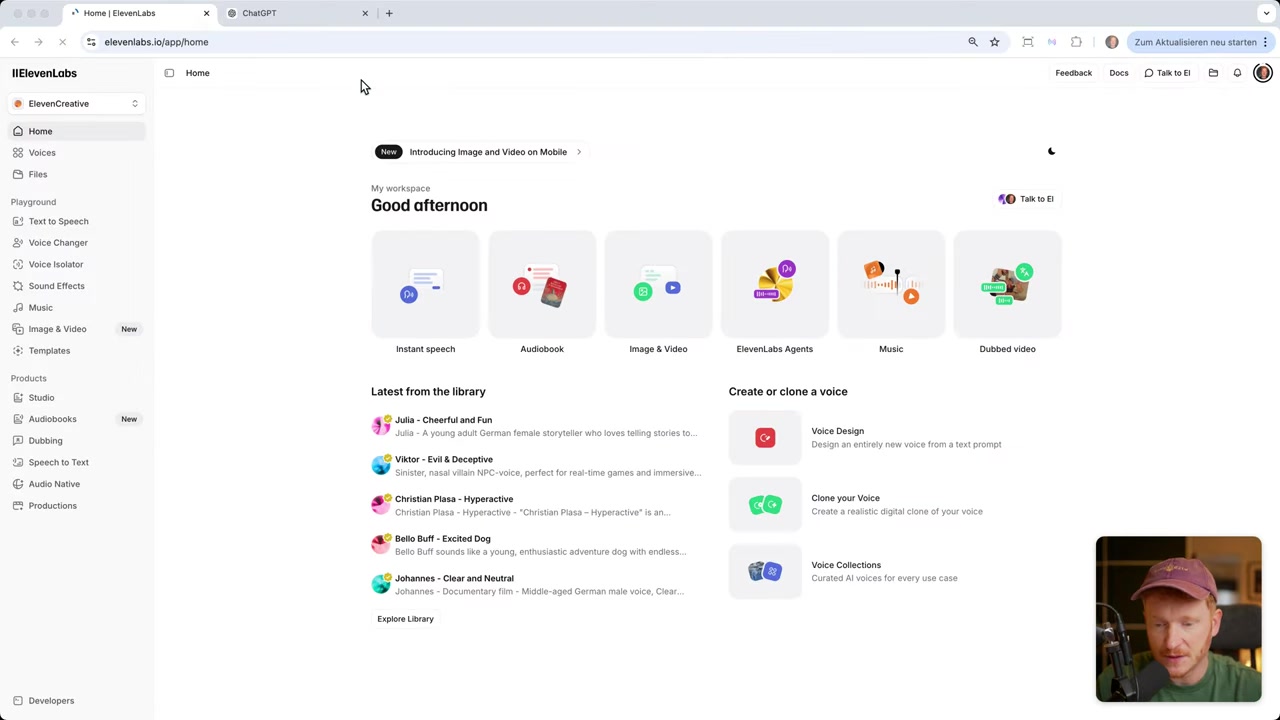
3. Using the Instant Speech Feature to Generate AI Voices
Click Instant Speech on the dashboard to get to the text-to-voice generator. Type in whatever you want the voice to say — for example, "Hey, I'm Julian and I want to show you how to generate AI voices with a single prompt."
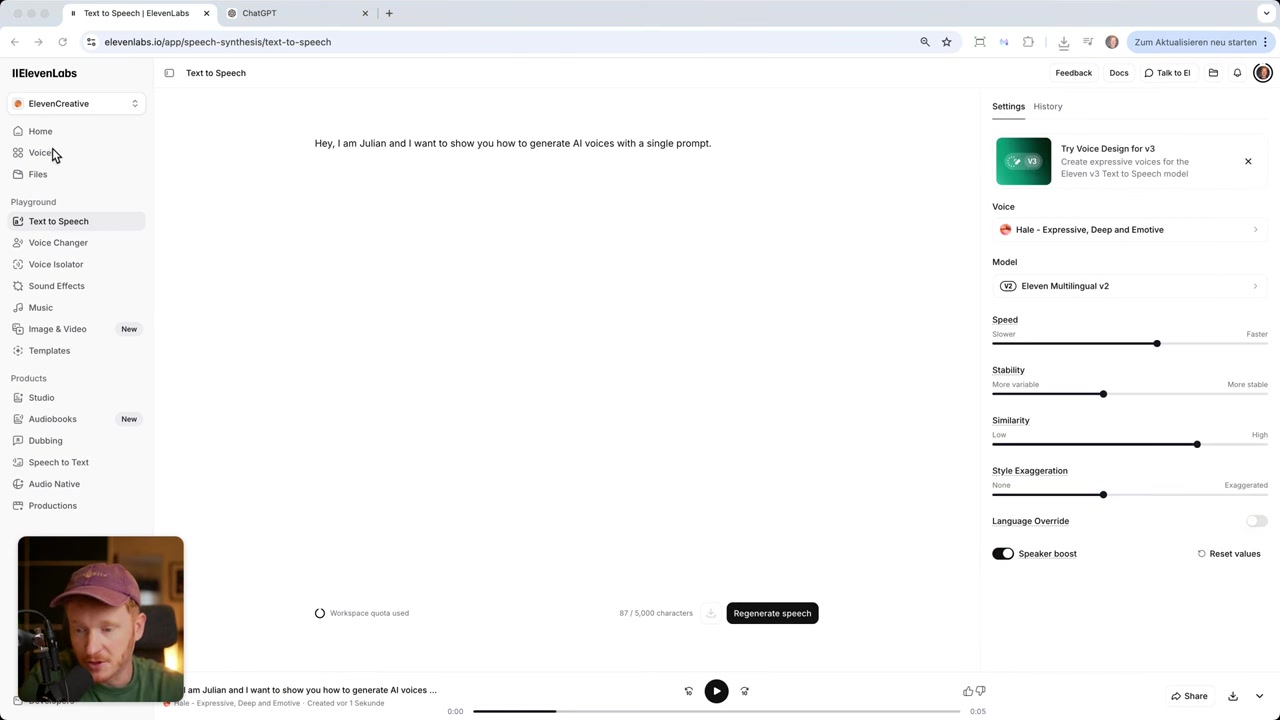
On the right side you'll see a library of voices. You can listen to samples before choosing. Hit the Explore tab to filter by language, accent (British or American), category (narration, conversational, social media, entertainment, educational), gender, and even age.
Once you find a voice you like, click it and you'll be taken to the generation settings page.
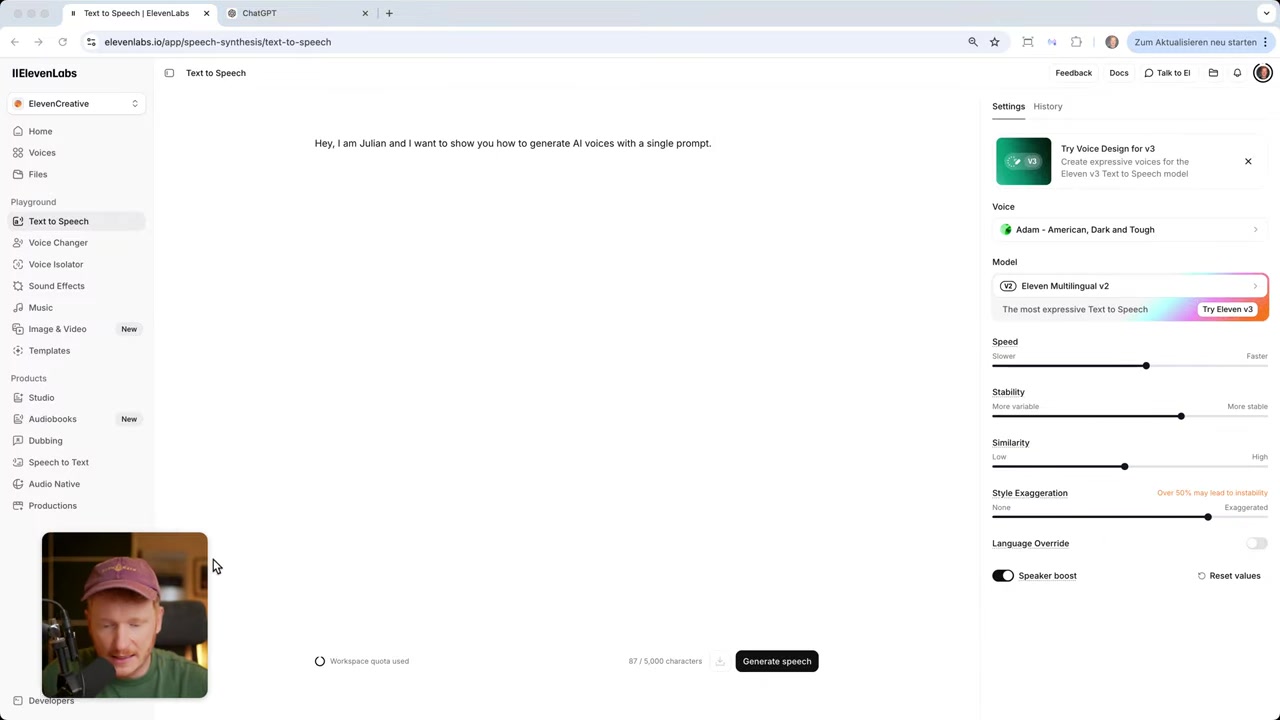
4. Voice Settings Explained – Speed, Stability, and Style
There are four main sliders to understand:
- Speed — How fast the voice speaks. The default of 1 works for most content. Bump it up for short ads or social media clips.
- Stability — Higher stability = more consistent voice across regenerations, but it can sound monotone. For longer texts, lower this value a bit to keep things natural.
- Similarity — Boosts voice clarity and how closely the output matches the target speaker.
- Style Exaggeration — Makes the voice more expressive and creative. Raising this from the default can add personality.
Julian's tip from the video: stability is the most impactful slider. If a generated voice sounds robotic, lower the stability first — that single change often makes it sound human. You can also hit Regenerate a few times, since each render comes out slightly different.
5. How to Clone Your Own Voice with ElevenLabs
One of the most impressive features is Instant Voice Clone. Go to the Voices section and click Add a Voice. From there, choose Instant Clone.
Record at least 30 seconds of your voice — just talk naturally. Something like introducing yourself, describing your project, or even talking about the weather works fine. The longer and cleaner the recording, the better the clone.
Give the voice a name, set the language, add an optional description, and save. Your cloned voice now appears in the voice library and you can use it for any text-to-speech generation on the platform.
This is perfect for audiobooks, YouTube narrations, or social media reels where you want your voice without recording every single line. Note that voice cloning requires the Pro plan — but you can sign up for free and explore it before deciding to upgrade.
6. The ElevenLabs Dubbing Feature – Translate Your Videos into Any Language
This is Julian's personal favourite ElevenLabs feature — and it's easy to see why. The Dubbing Station lets you take any video and translate it into another language using a cloned version of the original speaker's voice.
Here's how it works:
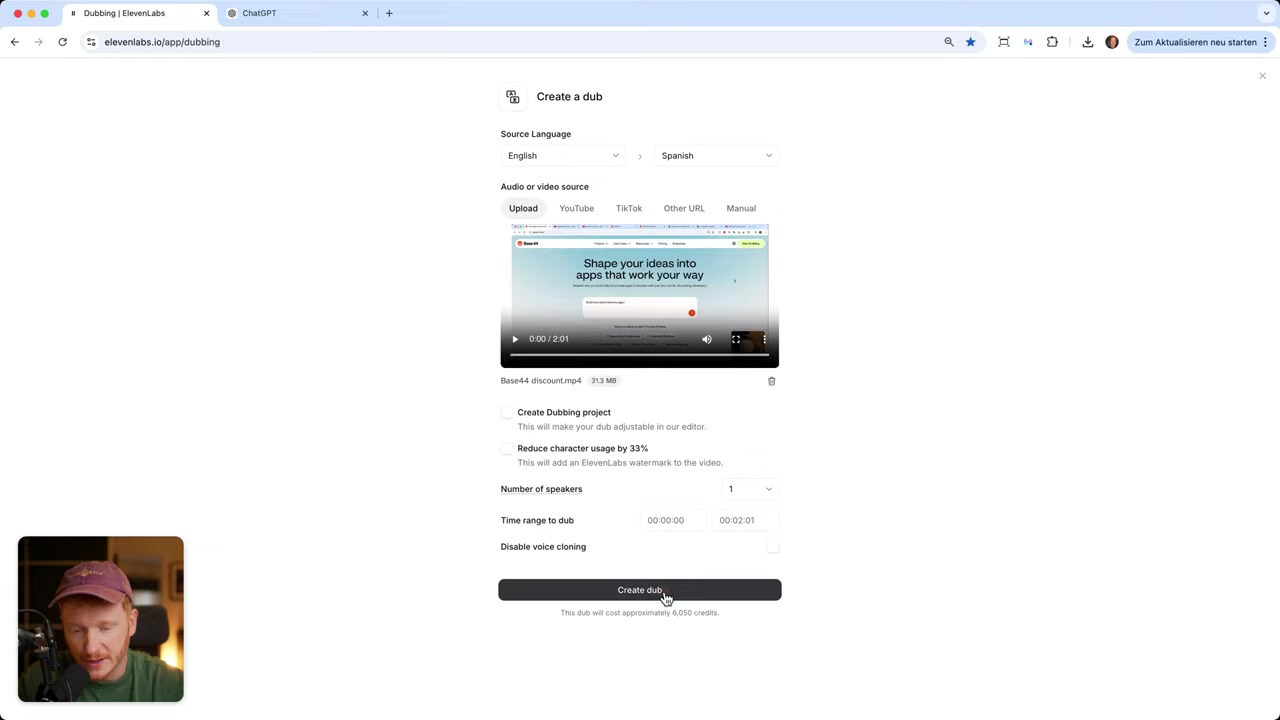
- Go to Dubbing and click Create a Dub.
- Upload your video (up to 1 GB) or paste a YouTube or TikTok link.
- Select the original language (or let ElevenLabs detect it automatically).
- Choose your target language — Spanish, Portuguese, Italian, German, Dutch, Japanese, Mandarin, Turkish, Swedish, Filipino, Malay, Romanian, and many more.
- Set the number of speakers in the video.
- Click Create and wait for the dub.
The platform clones the speaker's voice, translates the transcript, and produces a new audio track in the target language — synced to the original video. The result sounds remarkably natural.
Julian uses this feature daily to publish his YouTube videos in multiple languages. If you create any kind of video content — tutorials, vlogs, corporate marketing videos — this feature alone can massively expand your reach without any extra recording time.
7. More ElevenLabs Features Worth Knowing
Beyond voice generation and dubbing, ElevenLabs offers a growing set of audio tools:
- Audiobook Creator — Upload a Word document or any text file and ElevenLabs reads it aloud in your chosen voice (including your cloned voice).
- Podcast Studio — Generate full podcast-style conversations with AI voices.
- Background Noise Removal — Clean up audio from existing recordings.
- Captions — Auto-generate captions for your content.
- Speech to Text — Upload a video and get the full transcript back.
- Music Generation — Basic music creation is available, though for dedicated music AI Julian recommends Suno AI.
8. ElevenLabs Pros and Cons
Pros:
- Best-in-class voice quality and realism
- Huge library of pre-built voices
- Powerful voice cloning from a short recording
- Video dubbing in dozens of languages
- Full audio suite (audiobooks, podcasts, noise removal, captions)
- Free plan available with credits to get started
Cons:
- Voice cloning and dubbing require a paid (Pro) plan
- Dubbing uses credits, so high-volume usage adds up
- Music generation is less impressive than dedicated music AI tools
- Large video files (over 1 GB) can't be uploaded directly
9. How Much Does ElevenLabs Cost?
ElevenLabs offers a free plan that includes a set of credits you can use to test all the main features. It's genuinely useful for getting started and evaluating the tool.
When you need more — especially for voice cloning or regular dubbing — you'll need to upgrade to a paid plan. The Pro plan unlocks instant voice cloning and higher credit limits. Pricing can change, so check the latest on their website via the link below.
10. Is ElevenLabs Good for Beginners?
Absolutely. The interface is clean and well-organized. You don't need any audio editing background to get started — just type your text, pick a voice, and hit generate.
The voice settings (stability, speed, style) do require a bit of experimentation to get the best results, but Julian's guide above gives you a solid starting point. Most beginners find a great-sounding voice within their first few tries.
Frequently Asked Questions
Is ElevenLabs free to use?
How do I clone my voice with ElevenLabs?
What languages does ElevenLabs support for dubbing?
Can I use ElevenLabs to dub a YouTube video?
What is the stability slider in ElevenLabs?
What is ElevenLabs best used for?
Does ElevenLabs work for audiobooks?
How many credits does video dubbing use?
Related Articles
14 May 2026
How to Create Songs with Suno AI – Tutorial 2026 (Start for Free)
Ever wanted to create your own song but have zero musical experience? In this tutorial from the Julian Weber channel, you'll learn how to generate full, professional-sounding songs using Suno AI — fro...

28 Apr 2026
How to Redesign Your Website with AI (Free & No Code)
Is your website looking dated? In this tutorial from the Julian Weber channel, you'll see how to completely redesign an old website into a clean, modern, and high-converting page — in under 10 minutes...

17 Mar 2026
Base44 Superagents: The Free AI Agent That Automates Your Work
Base44 just released their Superagents to the public — and in this tutorial from the Julian Weber channel, you'll see exactly how to set one up, connect it to Gmail and Google Calendar, and automate r...