How I Built a $40K/Month App Using AI in 15 Minutes (Base44 Tutorial)
What if you could build a fully functional, monetizable app — without writing a single line of code? In this tutorial, we use Base44, a no-code AI app builder, to recreate a room design visualizer app inspired by one that reportedly earns around $40K per month. The result is a working app with a homepage, Stripe payments, user login, and a custom domain — all built in a single session using AI prompts.
1. What Is Base44?
Base44 is a no-code, AI-powered app builder that lets you describe what you want to build — and then actually builds it for you. You type (or speak) a prompt, and the AI generates HTML, CSS, and full app functionality in seconds.
It comes with a visual editor, mobile optimization, database support, user authentication, and built-in integrations — including Stripe for payments. No developer needed.
2. Finding a Profitable App Idea
Before opening Base44, you need a solid app idea. Two great sources stand out here:
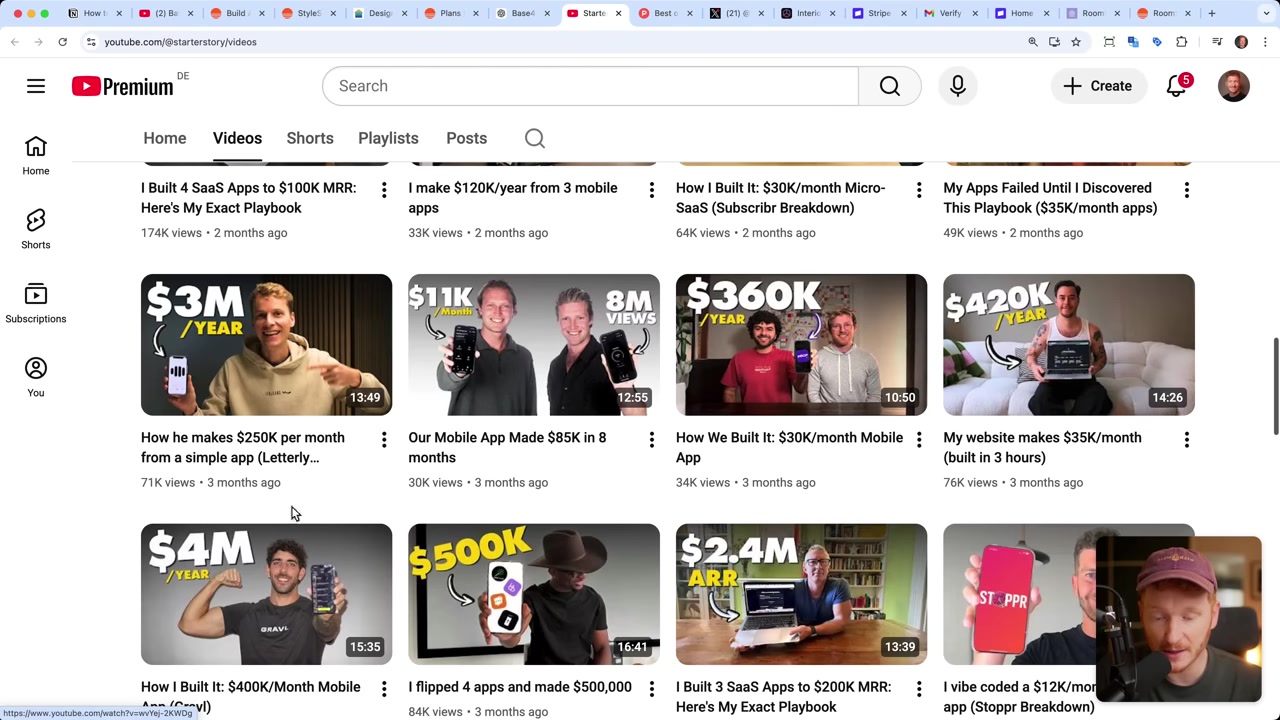
Starter Story (YouTube channel) — publishes interviews with indie developers sharing exactly how much they earn from their apps. You'll find examples like 70K/month, 3M/year — real numbers, real niches.
Product Hunt — a platform where startups launch apps to get initial traction. Browse the archive by year to see which apps got the most upvotes. It's a goldmine for spotting what people are actually willing to pay for.
For this tutorial, the inspiration came from a Twitter post by Levels.io — a developer who openly shares his revenue. His Interior Design AI app lets users upload a photo of their room and receive an AI-generated redesign. That's exactly what we're going to build.
3. Sign Up for Base44 and Start Building
Head to Base44 via the link below and create a free account. On signup you get 25 message credits — enough to build a solid first version of your app.
Once you're inside the dashboard, you'll see a prompt input field with a microphone icon. You can type or speak your app idea. For this tutorial, the prompt looks something like:
I want to develop a room visualizer where people can upload a picture of their living room. They can then choose a style — for example Scandinavian, minimalist, or similar. Think of about 8 different styles. Then they send the picture to the AI and it creates a new picture for them.Hit send — and watch the AI go to work. It will plan the features, write the HTML/CSS, and wire up all the logic. You just lean back.
4. Build Your App's Core Functionality with AI Prompts
Within minutes, Base44 generates a working interface. In this case: a photo upload area, a style selector (Scandinavian, Art Deco, Mid-Century, Bohemian, and more), and a "Generate Design" button.
Testing it live shows the AI transforming a plain meeting room photo into a clean Scandinavian-styled interior. It genuinely looks like an IKEA showroom — not a rough mockup.
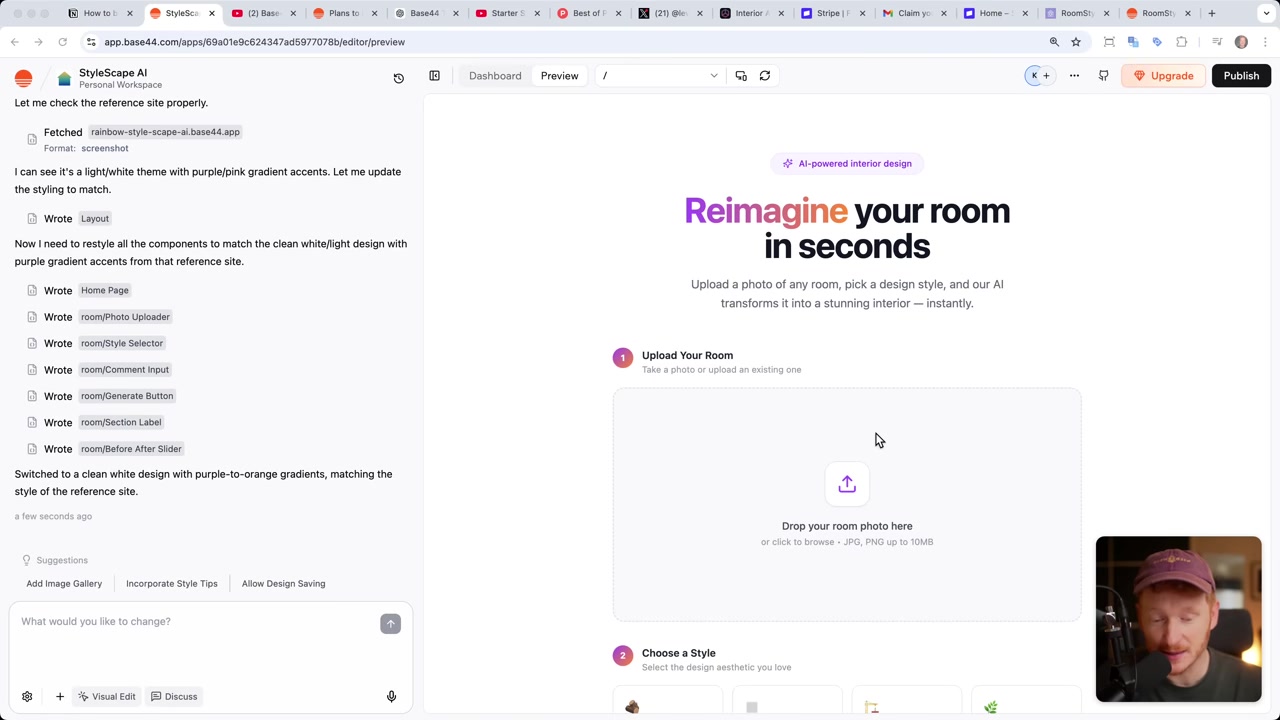
The entire core functionality — photo upload, style selection, AI image generation — was completed with just one or two prompts. That's the power of vibe coding platforms like Base44.
5. Build the Homepage and Contact Page
The core app is just the beginning. A real product needs a marketing homepage, a pricing section, and a contact form. You don't need a separate tool — just give Base44 another prompt:
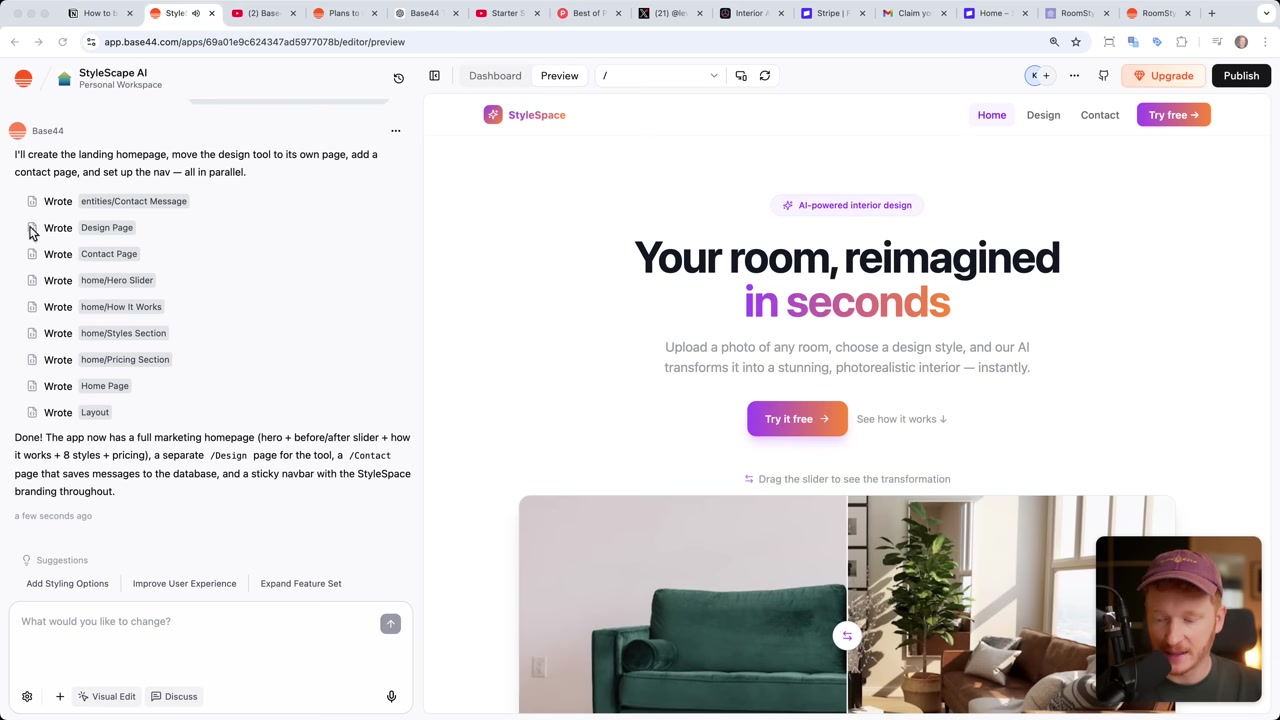
Now create a homepage that describes the product. Include a headline, a before/after image slider, a section explaining how it works, a section listing the available styles, and a pricing section. Free plan: 5 designs. Premium plan: $15/month for unlimited designs. Also add a contact page where people can reach us, and store messages in a database.A tip from experience: don't overload the AI with instructions at once. Build in small steps — core functionality first, then the homepage, then payments. This keeps things clean and prevents the AI from getting confused.
The generated homepage (which the AI named Style Space) includes a hero headline, a style showcase, a three-step how-it-works section, and a pricing table — all looking like a polished, professional website.
6. Connect Stripe as Your Payment Provider
Once the homepage is live, it's time to turn visitors into paying customers. Base44 integrates directly with Stripe — the most widely used payment processor for online businesses. It accepts credit cards, PayPal, and even crypto.
Simply prompt the AI:
Please integrate Stripe so we can accept payments. Use the premium plan for $15 from our homepage.Base44 will create a Stripe product, set the price, and email you to claim your Stripe sandbox account. The sandbox is a test environment — you can run fake transactions before going live.
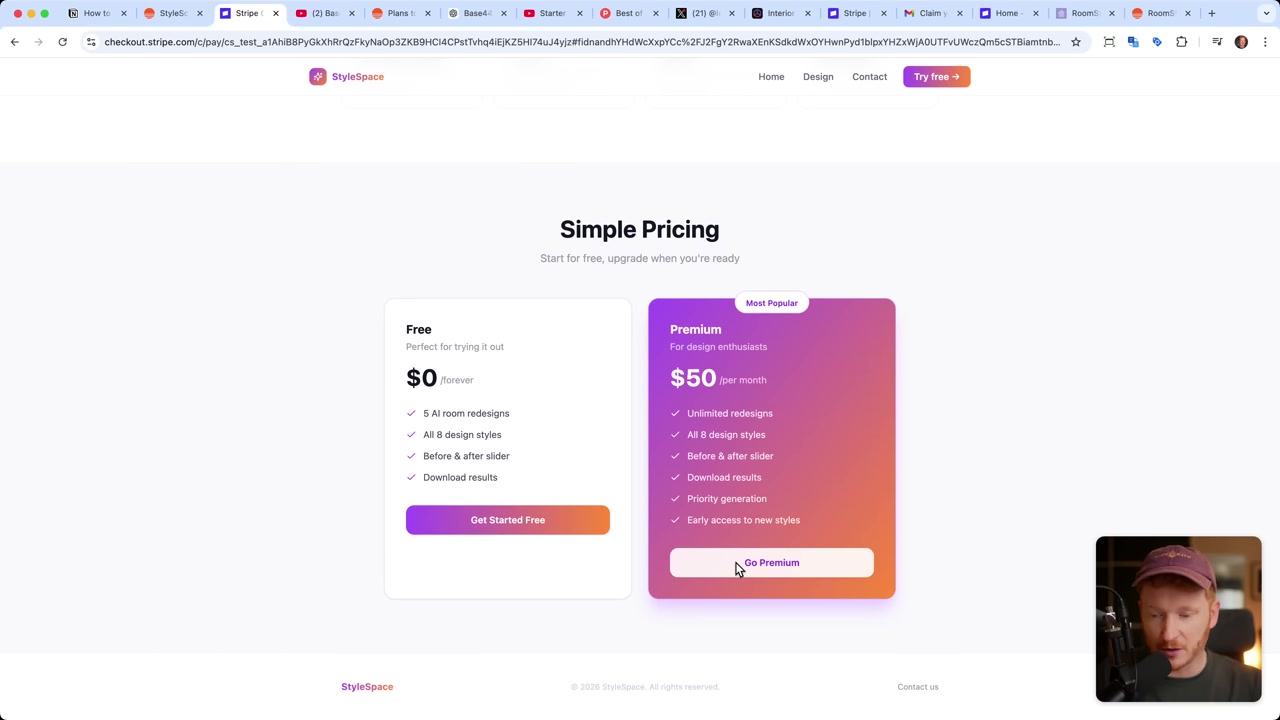
To test it: publish your app, click "Go Premium," and you'll be redirected to Stripe's checkout page. Use Stripe's test credit card number to simulate a purchase. Once confirmed, you're redirected back to your app — fully authenticated and subscribed.
When you're ready to accept real payments, go to your Stripe dashboard, switch to a live account, copy your live API keys, and paste them into Base44's integrations panel. That's it — your app is now making real money.
7. Connect Your Own Domain and Publish Your App
By default, Base44 publishes your app under a temporary subdomain. To look professional, you'll want a custom domain. Inside Base44, go to Domains and search for your desired name.
The domain search is powered by Ionos, a reliable domain registrar. Once purchased, allow 1–2 hours for DNS propagation, then refresh — your app is live at your own domain.
8. Add User Login and Free Plan Limits
The final piece is user authentication. You can prompt Base44 to require a signup before accessing the app:
If someone clicks on the 'Try for Free' button, please make them sign up first before they can use the app.Base44 adds a full signup/login flow — including two-factor authentication. Once a user signs up, they land in the app with their 5 free credits visible. When those run out, a popup prompts them to upgrade to premium.
You can manage all users and database entries (room designs, contact messages, etc.) directly from the Base44 dashboard. And if you ever need a new database table or custom data field, just ask the AI.
9. Base44 Pricing — How Much Does It Cost?
Base44 offers a free plan that includes 25 message credits per month (5 per day). This is enough to get a working prototype off the ground.
For more serious building, paid plans are available. The Builder plan shown in the video provides 250 credits — enough to iterate, polish, and launch a full product. Check the Base44 website for current plan details.
10. Is Base44 Good for Beginners?
Yes — Base44 is specifically designed for people with no coding background. The entire interface is prompt-driven. If you can describe what you want, the AI will build it.
The visual editor lets you click on any element to change text, colors, or layout. You can switch to mobile view instantly. And the "Discuss" mode lets you talk through ideas with the AI before committing to any changes.
The learning curve is minimal. The biggest challenge is coming up with a good app idea — the actual building is surprisingly straightforward.
11. Base44 vs Other No-Code App Builders
Compared to traditional no-code tools like Bubble or Webflow, Base44 is far more beginner-friendly. You don't drag and drop components — you just describe what you want in plain language.
Unlike pure website builders (like Wix), Base44 is designed for functional web apps — with databases, user auth, payment integrations, and custom logic. It's closer to a full-stack development environment, but accessible to non-developers.
If you're looking for website building specifically, Wix remains a solid option. But for building and monetizing a software product, Base44 is hard to beat.
Frequently Asked Questions
What is Base44?
Do I need coding skills to use Base44?
Can I really accept payments through Base44?
How many credits do I get on the Base44 free plan?
Can I use my own domain with Base44?
How do I find a good app idea to build?
Is the $40K/month figure realistic for everyone?
Does Base44 handle mobile optimization automatically?
Disclosure: Some links in this post are affiliate links. If you click through and make a purchase, a small commission may be earned at no extra cost to you. All content is provided for informational and educational purposes only. No guarantee of results is given. Nothing in this post constitutes financial, legal, tax, or investment advice.
Related Articles
26 Apr 2026
How to Clone Any Website for Free with AI (Base44 Tutorial)
What if you could clone an entire website in under five minutes — without writing a single line of code? In this tutorial, Julian Weber walks you through exactly how to do that using Base44, a powerfu...

17 Mar 2026
Base44 Superagents: The Free AI Agent That Automates Your Work
Base44 just released their Superagents to the public — and in this tutorial from the Julian Weber channel, you'll see exactly how to set one up, connect it to Gmail and Google Calendar, and automate r...

24 Apr 2026
Create Your Own Game with Base44 (No Coding Required)
Want to build your own game but have zero coding experience? In this tutorial, Julian Weber walks you through how to use Base44 — an AI-powered app and game builder — to create a fully playable game f...